
Many people worry that security cameras could be hacked or accessed without permission.
And while security cameras can be vulnerable if poorly configured, most problems are usually caused by:
- weak or reused passwords
- outdated camera software
- exposed remote access
- or poorly protected accounts
The good news is that most risks are manageable with simple security practices.
This guide explains:
- the real risks that matter
- common misconceptions
- and practical ways to make your security camera system safer without becoming overly paranoid.
Quick Answer: Can Security Cameras Be Hacked?
Yes — security cameras can potentially be hacked, especially if they use:
- easy-to-guess or reused passwords
- outdated camera software
- exposed internet access
- or poorly protected cloud accounts
However, most modern systems from reputable brands are reasonably secure when configured properly.
For most homeowners and small businesses, the bigger risk is usually poor setup or account protection — not advanced hacking attacks..
What People Actually Worry About
Most people are not looking for a deep cybersecurity lecture.
They simply want to know:
- Can someone watch my camera without permission?
- Can someone access recordings of my home or business?
- Is WiFi safe enough?
- Is cloud storage risky?
- What practical steps should I take?
These are reasonable concerns.
Security cameras are useful tools, but they should be treated like other internet-connected devices:
- phones
- smart TVs
- smart locks
- or computers
Good setup and basic security practices make a major difference.
The Most Common Security Camera Risks
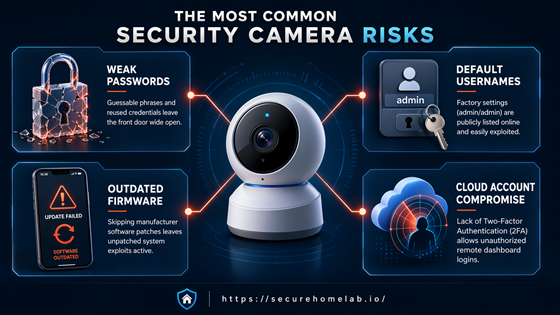
Weak Passwords
Weak passwords are one of the biggest risks.
Examples include:
- 123456
- password
- reused passwords from other websites
Even if the camera hardware itself is secure, a weak account password can become the easiest way into the system.
Practical advice:
- Consider using a password manager to create and store safer logins ger
- Use a unique password for your camera account
- Do not reuse passwords from email, banking, or shopping accounts
Default Usernames and Passwords
Some devices ship with default usernames or passwords.
If those credentials are never changed, they can become an easy target.
Practical advice:
- One of the first setup steps should be changing any default login details.
Outdated Firmware
Firmware is the software running inside the camera or recorder.
Manufacturers release updates to:
- improve performance
- fix bugs
- patch security vulnerabilities
Ignoring updates for years may leave known weaknesses unpatched.
Practical advice:
- Enable automatic updates if available
- Periodically check whether the camera, app, or recorder has updates available
- Choose brands that continue supporting their devices after purchase
Cloud Account Compromise
Many camera systems use cloud accounts for:
- remote viewing
- alerts
- cloud storage
In many cases, the bigger risk is not the camera itself — it is the online account connected to it.
If someone gains access to the account, they may be able to:
- view live feeds
- access recordings
- or change settings
This can happen through:
- stolen passwords
- phishing emails
- reused credentials
Practical advice:
- Enable two-factor authentication, also called 2FA
- Use a unique login for the camera account
- Be careful with suspicious emails or fake login pages
- Remove old users who no longer need access
Can WiFi Security Cameras Be Hacked More Easily?
Not necessarily.
WiFi cameras are not automatically unsafe.
The overall security depends more on:
- product quality
- account protection
- WiFi settings
- whether the device is kept updated
- and proper setup
For many homes, a properly configured WiFi camera from a reputable brand can be perfectly reasonable.
Practical advice:
- Use WPA2 or WPA3 WiFi security
- Keep your router updated
- Use a hard-to-guess router password
- Consider placing smart devices on a separate guest or device network
For more details, see our guide to PoE vs WiFi security cameras
Is Local Storage Safer Than Cloud Storage?
Local storage can improve privacy, but it is not a magic shield.
Local storage systems may:
- reduce cloud exposure
- reduce dependence on outside servers
- provide more direct control over recordings
However:
- weak passwords
- outdated devices
- poor network security
can still create risks.
Important idea:
Local storage is one layer of protection — not complete protection by itself.
If you want to understand the differences more deeply, see our guide to security cameras without monthly fees
Is Cloud Storage Always Unsafe?
No.
Cloud storage has both:
- risks
- and benefits
Cloud storage benefits:
- remote access
- easier sharing
- backup if a camera is stolen
- off-site footage protection
Cloud storage risks:
- account compromise
- weak passwords
- poor provider security
- over-sharing access
For many people, cloud storage can be perfectly reasonable when paired with:
- a unique, hard-to-guess account password
- two-factor authentication, or 2FA
- a reputable provider
- and careful account management
Storage choice is often part of a broader privacy and security decision. If you’re weighing the tradeoffs between local recording, cloud storage, and hybrid systems, see our guide to local storage vs cloud storage for security cameras.
The Bigger Risk Is Usually Poor Setup
Most people are not personally targeted by sophisticated hackers. The more common problem is automated attacks looking for easy opportunities, such as reused passwords, outdated devices, or exposed remote access.
That is why basic setup matters so much. A properly maintained system from a reputable brand is much harder to compromise than a neglected system using default login details.
For most homes and small businesses, simple precautions dramatically reduce the risk.
Understanding how problems usually happen makes it easier to focus on the protections that actually matter.
How Security Cameras Usually Get Compromised
In most cases, security cameras are not compromised because someone is sitting outside your home trying to break into the camera directly. Unauthorized access usually happens through simpler paths.
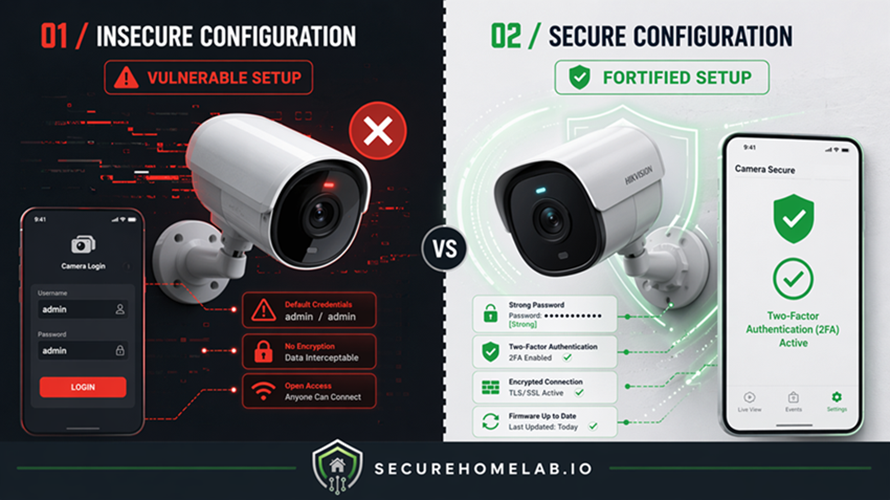
One common example is password reuse. If the same email and password were used on another website that suffered a data breach, attackers may try that combination on camera apps and other online accounts.
Another issue is neglected maintenance. A camera or recorder that has not been updated in years may still have weaknesses that newer software has already fixed.
Remote viewing can also add risk if it is set up carelessly. The convenience of checking cameras from anywhere should be paired with a unique login, two-factor authentication, and limited account sharing.
The important point is simple: most risk comes from avoidable setup mistakes. A well-configured system from a reputable brand is far less vulnerable than a cheap, outdated device using default login details.
What Most People Get Wrong
Many people assume:
- all WiFi cameras are unsafe
- local storage is impossible to hack
- or cloud storage is automatically dangerous
Reality is usually more balanced.
A properly configured WiFi camera can be very secure.
A poorly configured local-storage system can still have vulnerabilities.
Good security usually comes from:
- thoughtful setup
- regular updates
- strong account protection
- and realistic expectations
| Concern | Biggest Real Risk |
| WiFi cameras | Weak setup or poor account protection |
| Cloud storage | Compromised accounts or reused passwords |
| Local storage systems | Weak passwords or outdated devices |
| Wired/PoE systems | Network or account vulnerabilities |
| Smart camera apps | Poor login security or shared access |
What Practical Security Steps Matter Most?
For most people, these basic practices provide the biggest improvement:
| Security Step | Why It Matters |
| Strong unique passwords | Prevents easy account access |
| Two-factor authentication | Adds extra protection |
| Firmware updates | Fixes known vulnerabilities |
| Trusted brands | Usually provide better support |
| Secure WiFi setup | Protects device communication |
| Limited account sharing | Reduces unnecessary exposure |
If you only do a few things, start with the basics: use a unique password, turn on two-factor authentication, and keep the camera app, recorder, and device software updated.
For WiFi cameras, your router also matters. A secure camera can still be affected by a poorly protected home network. Use a hard-to-guess WiFi password, avoid outdated router security settings, and update your router when updates are available.
You do not need to become a cybersecurity expert to make your cameras safer. The goal is to remove the easy opportunities that attackers and automated tools often look for.
Securing your account is only part of protecting camera privacy. You should also decide who should have access to your cameras and what privacy boundaries make sense for your setup, including what cameras can see, when they should be active, and what shared users are allowed to do.
What About Indoor Privacy Concerns?
Some people are less concerned about hacking and more concerned about feeling constantly monitored.
This is one reason many homeowners:
- avoid placing cameras in private indoor areas
- disable indoor cameras during gatherings
- or use cameras mainly for entry points and outdoor coverage
Security should improve comfort and awareness — not make people feel uncomfortable in their own homes.
A good rule of thumb is to place cameras where they serve a clear security purpose. Entryways, driveways, garages, and main access points, not bedrooms, bathrooms, or private living areas.
If you use indoor cameras, look for features such as privacy mode, physical shutters, scheduling, or the ability to turn recording off when people are home. These features can help balance security with comfort. Privacy is not only about hacking. It is also about how a camera changes the way people feel in a space.
Which Security Camera Setup Is Usually Safer?
For many homeowners:
- reputable WiFi cameras
- local storage
- unique account logins
- and two-factor authentication
are already a very reasonable setup.
For businesses or reliability-focused users:
- PoE systems
- local recording
- segmented networks
- and controlled user access
may provide stronger long-term control.
If you are still comparing cameras, sensors, alarms, and monitoring options, our guide to home security system basics can help you understand how the pieces fit together before choosing a setup.
For placement guidance, see our guide on where to place security cameras.
Frequently Asked Questions
Can someone watch my security cameras remotely?
If an account or device is compromised, unauthorized access may be possible. This is why a unique account password and two-factor authentication are important.
Are WiFi security cameras safe?
They can be, especially when you use:
- a unique camera account password
- updated device software
- secure WiFi settings
- and a reputable brand
Is local storage safer than cloud storage?
Local storage can improve privacy and reduce cloud dependence, but it still requires proper security practices.
Can wired security cameras be hacked?
Wired cameras can still have security risks, especially if they connect to a network or allow remote viewing. A wired connection may reduce some WiFi-related risks, but it does not replace secure login habits, regular device updates, and good account management.
For more details, see our guide to PoE vs WiFi security cameras.
Should I use two-factor authentication for security cameras?
Yes. Two-factor authentication, often called 2FA, is one of the easiest ways to add another layer of protection to your camera account.
Do businesses need stronger camera security?
Often yes. Businesses may have:
- more cameras
- more users
- longer storage retention
- and greater privacy responsibilities
Final Thoughts
Security cameras can have vulnerabilities, but most risks are manageable with good setup and basic security practices.
For most people, the goal is not perfection or paranoia.
The goal is:
- reducing unnecessary risk
- protecting privacy
- and building a system that is practical, reliable, and manageable.
In most cases, unique logins, regular updates, trusted brands, and thoughtful setup matter far more than fear-driven headlines about hacking