
Most people know they need security cameras, but many cameras are installed in the wrong places.
The result?
Footage that misses faces, blind spots around entry points, and cameras that don’t actually improve security.
In this guide, you’ll learn where to place security cameras around a home or small business, which locations to prioritize first, and what common placement mistakes to avoid.
Quick Answer: Best Places to Install Security Cameras
If you are only installing a few cameras, start with the highest-risk areas first.
| Priority | Camera Location | Why It Matters |
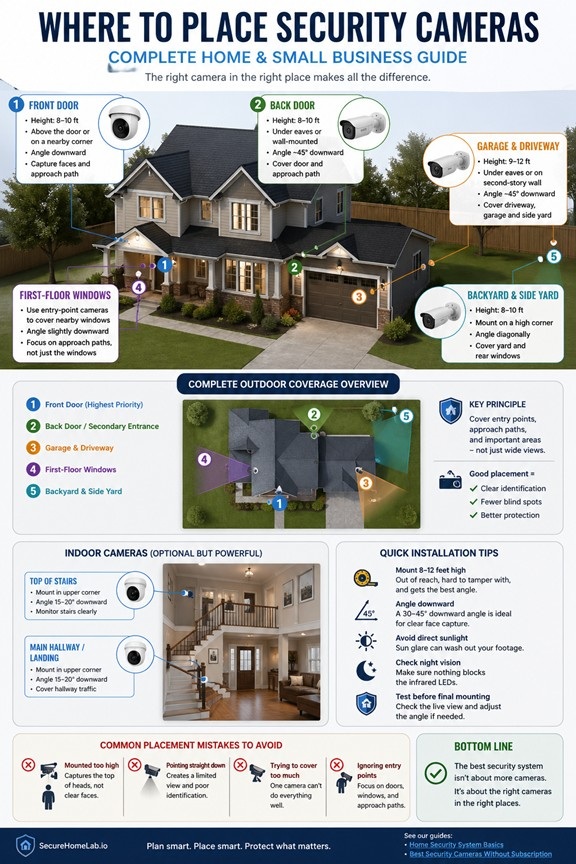
| 1 | Front door (highest priority) | Captures visitors, deliveries, and the most common entry point |
| 2 | Back door or side entrance | Covers less visible access points |
| 3 | Garage and driveway | Protects vehicles, tools, and garage access |
| 4 | Backyard or side yard | Covers blind spots and rear approaches |
| 5 | Main hallway or stairs | Tracks indoor movement if someone gets inside |
👉 Start with entry points first — then expand coverage if needed.
The diagram below shows a simple, effective way to position cameras around a typical home.
Why Security Camera Placement Matters
A camera in the wrong position is almost as bad as no camera at all.
The goal is not just to see activity. The goal is to capture useful footage: faces, direction of travel, vehicles, entry points, and the moments before and after an event.
Good placement ensures:
- Clear identification (faces, not just movement)
- Coverage of entry points and approach paths
- Fewer blind spots
Proper placement is one of the most important factors in whether a security system actually works in real-world situations.
👉 If you are still learning how cameras, sensors, alarms, and monitoring fit together, see our guide to home security system basics.
Basic Security Camera Placement Rules
Before choosing exact locations, keep these simple rules in mind:
- Place cameras where people naturally approach, not just where you want a wide view
- Capture faces, not just motion
- Avoid mounting cameras too high (you’ll only see the tops of heads)
- Use overlapping coverage to reduce blind spots
- Test your camera view before mounting permanently
- Avoid pointing directly into sunlight or reflective surfaces
- Protect outdoor cameras under eaves or covers when possible
👉 Good placement is about angles and intent—not just coverage.
For most outdoor home cameras, 8 to 10 feet high is a good starting point. This is usually high enough to reduce tampering, but low enough to capture faces clearly.
If you’re new to how systems work, understanding home security system basics can help you make better placement decisions.
Front Door (Highest Priority)
Your front door is the most important place to install a camera.
Recommended placement:
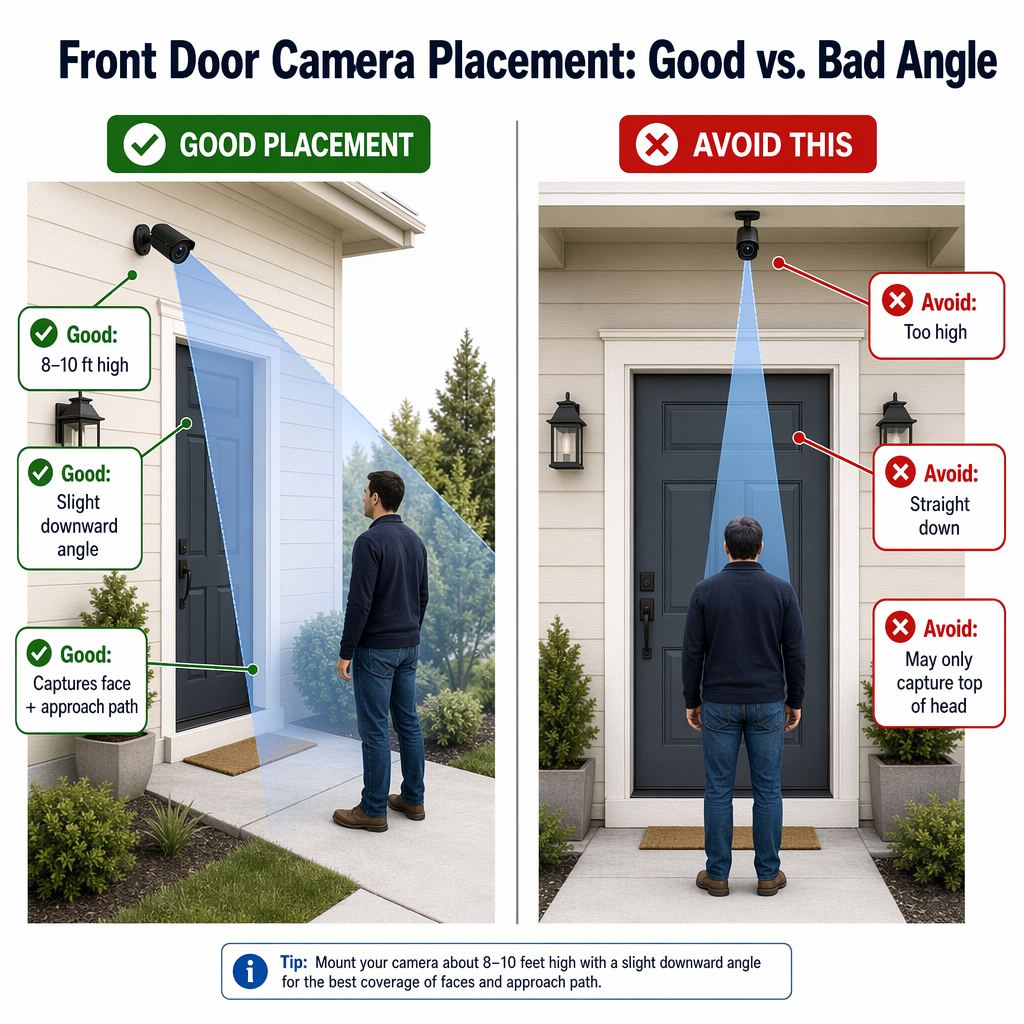
- Height: 8–10 feet
- Position: Above the door or slightly off to the side
- Angle: Downward (not straight down)
What a good setup should do:
- Capture faces clearly
- Show the approach to the door (not just the doorway)
- Avoid being mounted too high
👉 A slightly angled view from the side often gives better identification than a straight overhead view.
The diagram below shows front door camera placement: good angle vs. bad angle.
A video doorbell can work well here, but a separate camera mounted slightly higher or off to the side may provide a wider view of the porch, walkway, and package delivery area.
Many modern cameras offer features like motion alerts and local storage without requiring a monthly fee.
Back Door & Secondary Entrances
Burglars often avoid the front door and use less visible entry points.
Recommended placement:
- Height: 8–10 feet
- Under eaves or wall-mounted
- Angle: ~45° downward
Coverage goal:
- Door + approach path
- Immediate surrounding area
👉 Use cameras with strong night vision for low-light areas.
Garage & Driveway
The garage is one of the most overlooked — but high-value — areas.
Recommended placement:
- Height: 9–12 feet
- Mount under eaves or second-story wall
- Angle: ~45° downward
Coverage goal:
- Full driveway
- Garage door
- Side yard (if applicable)
Try to position the camera so it captures both people walking up the driveway and vehicles entering or leaving. If license plate detail is important, you may need a camera aimed more directly at the driveway rather than a wide overhead view.
👉 This angle helps capture both vehicles and people approaching.
Backyard & Side Yard
These areas often have the least visibility—but still need coverage.
Recommended placement:
- Height: 8–10 feet
- Corner-mounted for wide coverage
- Angle: Diagonal, overlapping view
Coverage goal:
- Entry points into the yard
- Back windows and doors
👉 One well-placed wide-angle camera can often cover multiple windows.
First-Floor Windows
You usually don’t need a camera for every window.
Smarter approach:
- Use cameras at entry points to cover nearby windows
- Place one camera to cover multiple windows when possible
If a window is hidden from the street, blocked by landscaping, or near a fence, it may deserve more attention than a highly visible front-facing window.
Key principle:
👉 Focus on approach paths, not just the windows themselves.
Indoor Cameras (Hallways & Stairs)
Indoor cameras are optional — but very useful.
Recommended placement:
- Top of stairs (looking down)
- Main hallway or central area
- Corner-mounted, slightly angled down
Coverage goal:
- Track movement between floors
- Capture clear face-level footage
👉 Indoor cameras work best as a secondary layer, not your first line of defense.
Real-World Example: Simple Home Camera Setup
This type of setup works well for both single-story and two-story homes.
Here’s a practical setup for a typical home:
- 1 camera at the front door
- 1 camera at the back door
- 1 camera covering garage + driveway
- 1 camera covering backyard
Optional:
- 1–2 indoor cameras for hallways or stairs
👉 This setup covers the most important areas without overcomplicating things.
If you are still choosing cameras, our guide to security cameras without monthly fees can help you compare options that do not require an ongoing subscription.
Where to Place Security Cameras for Small Businesses
Security camera placement for small businesses follows the same core principles as homes — but the priorities are different.
Instead of just monitoring entry points, businesses need to focus on theft prevention, employee safety, and liability protection.
Priority Areas to Cover
If you’re setting up cameras for a small business, start with these key locations:
- Entrances and exits
Capture clear face-level footage of everyone entering and leaving. - Point of sale (POS) or cash register
Monitor transactions and reduce internal theft or disputes. - Inventory or storage areas
Protect high-value items and stockrooms. - Main customer areas (sales floor, lobby, waiting area)
Maintain visibility without invading privacy. - Parking lot or exterior perimeter
Cover vehicles, delivery areas, and after-hours activity.
👉 Start with these areas before adding more cameras.
👉 For equipment recommendations, see our guide to security cameras for small business.
How Business Placement Differs from Home Setup
While home security focuses on entry points, business security adds another layer:
- More focus on people + transactions (not just access points)
- Wider coverage of open spaces (like retail floors or offices)
- Stronger need for evidence-quality footage
👉 In a business setting, cameras aren’t just for alerts — they’re often used to review incidents and resolve disputes.
Simple Small Business Camera Setup Example
A basic setup for a small retail shop or office might look like:
- 1 camera at the main entrance
- 1 camera focused on the register or front desk
- 1–2 cameras covering the main floor or workspace
- 1 camera in the storage or back room
- 1 outdoor camera for the parking lot or rear entrance
👉 This setup provides strong coverage without overcomplicating installation.
Important Privacy Considerations
When installing cameras in a business, be mindful of privacy laws and expectations:
- Avoid placing cameras in restrooms or private areas
- Inform employees and customers when recording is in use
- Follow local regulations for video surveillance
👉 Transparency helps build trust and avoids legal issues.
While the core principles are the same, business security is ultimately about balancing visibility, accountability, and protection.
Common Camera Placement Mistakes
Avoid these common issues:
- Mounting cameras too high (only capture tops of heads)
- Pointing cameras straight down
- Trying to cover too much with one camera
- Ignoring entry points in favor of wide views
- Capturing more of a neighbor’s property than the camera’s security purpose requires
- Using an unnecessarily broad angle that records more sidewalk, street, or surrounding activity than needed.
👉 Good placement is about angles and coverage — not just quantity.
Placement is the first privacy decision because it determines what the camera can see in the first place. Once the view is appropriate, our guide to security camera privacy settings can help you decide what the camera should notice, record, and share afterward.
Installation Tips That Make a Big Difference
- Test angles before mounting permanently
- Avoid pointing directly into sunlight
- Make sure night vision isn’t blocked
- Keep cameras out of easy reach
👉 Small adjustments can dramatically improve footage quality.
Where NOT to Place Security Cameras
While camera placement improves security, it’s equally important to respect privacy and local laws.
Avoid placing cameras in:
- Bathrooms or changing areas
- Bedrooms or private sleeping spaces
- Areas that directly face a neighbor’s windows or private property
- Locations where audio recording may violate local laws
👉 As a general rule, avoid recording anywhere people expect privacy.
Final Thoughts
The best security camera setup isn’t about having more cameras — it’s about placing them correctly.
Start with your entry points, focus on clear angles, and expand only when needed.
👉 If you’re still choosing equipment, see our guide to security cameras without monthly fees.
⚡“This guide focuses on homes. If you’re securing a business, placement priorities are slightly different.”
In future guides, we’ll cover more advanced setups for small businesses and multi-camera systems.