
If you’ve started researching home security systems, you’ve probably noticed something quickly:
Most explanations are either too technical or too vague to be useful.
You’ll see terms like motion detection, sensors, monitoring plans, local storage… but it’s not always clear how these fit together in a real home.
This guide breaks everything down simply – how home security systems work, so you can understand what you really need (and what you don’t).
If you’re looking for specific camera recommendations, we’ll link to those throughout.
🔍 Quick Answer
A home security system is a combination of cameras, sensors, and alarms that work together to detect activity, record events, and alert you to potential threats. Most modern systems also include a mobile app, storage (cloud or local), and optional professional monitoring.
Quick Comparison: Cameras vs Sensors vs Alarms
| Component | What It Does | Best For |
| Cameras | Record video and monitor activity | Visibility and evidence |
| Sensors | Detect motion, doors, windows | Early alerts |
| Alarms | Trigger alerts or sirens | Immediate response |
A home security system is made up of three main parts:
- Cameras (to see what’s happening)
- Sensors (to detect activity like doors opening)
- Alarms (to alert you or scare off intruders)
Most modern systems combine all three, but not every home needs every component.
In addition to these three core components, most modern systems also include:
- A central hub or base station (connects devices)
- A mobile app (for alerts and control)
- A storage system (cloud or local)
- Optional professional monitoring
These support the system — but the core function still comes down to cameras, sensors, and alarms working together.
👉 If you want to skip monthly fees, check out our guide security cameras without monthly fees.
How a Home Security System Works (Simple Example)
At a basic level, a home security system works by detecting activity and notifying you.
Here’s a simple real-world example:
- A door sensor detects that your front door has opened
- A camera starts recording the event
- The system sends an alert to your phone
- Depending on your setup, an alarm may sound
- If you have professional monitoring, a monitoring center may contact you or emergency services
Most modern systems automate this entire process — you just receive alerts and decide how to respond.
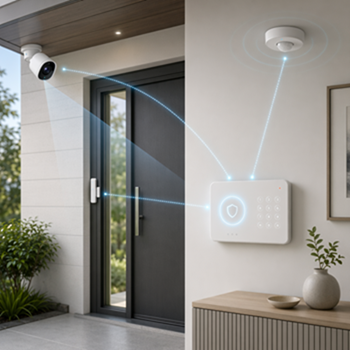
Understanding this flow makes it much easier to choose the right setup for your home.
The 3 Core Components Explained
1. Security Cameras
Cameras are the most visible part of any system.
They allow you to:
- Monitor your home in real time
- Record events
- Check in remotely from your phone
There are two main types:
- Indoor cameras (monitor rooms, entryways, babies, pets)
- Outdoor cameras (watch doors, driveways, yards)
Many homeowners start with basic cameras and later upgrade to systems with local storage and no subscription fees for better long-term value.
👉 If you’re comparing camera options, see our guide to security cameras without monthly fees.
2. Sensors (The “Invisible” Protection)
Sensors are what actually detect activity.
Common types:
- Door/window sensors
- Motion detectors
- Glass break sensors
These are critical if you want alerts before something happens not just video after.
3. Alarm Systems
Alarms are your response layer.
They can:
- Trigger loud sirens
- Send alerts to your phone
- Notify a monitoring service
Some systems include professional monitoring (monthly fee), while others are fully DIY.
Hub, Control Panel, and Mobile App
Most modern security systems include a central way to connect and control everything.
This can be:
- A hub or base station (connects your devices)
- A control panel (common in alarm systems)
- A mobile app (used in almost all systems today)
In most home setups, the mobile app becomes your main control center—where you:
- Receive alerts
- View camera footage
- Adjust settings
👉 For most homeowners, a simple and reliable app matters more than having a complex control panel.
Storage and Monitoring Options
A home security system also needs a way to store footage and handle alerts.
Video Storage
Most systems use one of two options:
- Cloud storage
Footage is saved online and accessible from anywhere
Often requires a monthly subscription - Local storage
Footage is saved on a memory card, base station, or recorder in your home
No monthly fee, but limited by storage capacity
Cameras are only one part of a security system, but where footage is stored can significantly affect privacy, reliability, and cost. Learn more in our guide to local storage vs cloud storage for security cameras.
Monitoring Options
There are also two main ways to handle alerts:
- Self-monitoring
You receive alerts and decide how to respond - Professional monitoring
A monitoring center responds for you, usually for a monthly fee
👉 If you prefer to avoid monthly fees, you’ll want to focus on systems with local storage and self-monitoring.
You can see examples here: Best Security Cameras Without Subscription (2026 Guide)
Wired vs Wireless Security Systems: What’s the Difference?
This is one of the first big decisions.
- Wired systems → more reliable, harder to install
- Wireless systems → easier setup, more flexible
For most homeowners, wireless systems are the practical starting point.
👉 Full breakdown here:
[Wired vs Wireless Security Cameras: Which Is Better?]
What a Typical Home Security Setup Looks Like
If I were setting up a simple system for my own home, I would start with:
- 1 front door camera
- 1 backyard or side camera
- 1 indoor camera (optional)
- 2–4 door/window sensors
That covers most real-world needs without overcomplicating things.
Where Should You Install Cameras?
Placement matters more than the camera itself.
Bad placement = missed events.
Start here:
- Front door (highest priority)
- Back/side entrances
- Main indoor entry point
👉 For optimal results, camera placement matters. Learn more about where to place security cameras.
Do You Need a Full System Right Away?
No.
One of the biggest mistakes is overbuying upfront.
A smarter approach:
- Start small
- Learn how you use it
- Expand if needed
If you want to avoid monthly fees, many modern systems now offer local storage and full functionality without subscriptions — see security cameras without monthly fees.
What About Privacy?
This is often overlooked—but important.
Things to consider:
- Avoid placing cameras in private areas
- Use local storage if privacy matters
- Turn off indoor cameras when home
👉 Once you understand how the system works, the next question is how you want its cameras to behave. Our guide to the security camera privacy settings that matter most covers what cameras should see, notice, and record, who should have access, and what happens to footage afterward.
What Should You Do Next?
If you’re just getting started, here’s a simple path:
- 👉 Learn Where to Place Security Cameras to understand optimal camera positioning
- 👉 If you’re comparing options, see our guide to security cameras without monthly fees to find the right equipment.
- 👉 If you’re setting up a business, see our guide to security cameras for small business.
Final Thoughts
A good home security system isn’t about having the most cameras – it’s about having the right setup.
Start simple:
- Cover key entry points
- Use reliable equipment
- Focus on practical use
From there, you can always expand.