
When choosing a security camera system, one of the biggest decisions is where your footage will be stored.
Should recordings stay on a local device such as an SD card, NVR, or hard drive?
Or should footage be stored in the cloud through a provider’s service?
Many buyers assume this is purely a technical decision. In reality, it is often a decision about privacy, convenience, cost, trust, and control.
Some people want a simple system that works with minimal effort. Others want more ownership and less dependence on a provider.
The good news is that neither option is automatically right or wrong.
As shown in the diagram below, your decision hinges entirely on balancing these competing priorities.
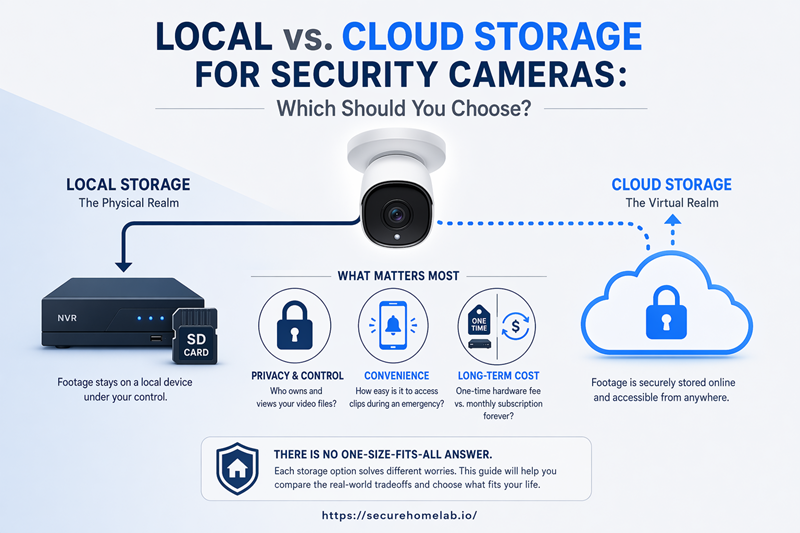
Choosing where your security footage lives impacts your privacy, convenience, and long-term costs.
When comparing local vs cloud storage for security cameras, many buyers focus on storage location first.
This guide explains the core differences, the real-world tradeoffs, and how to decide which option best fits your situation.
Quick Answer: Local Storage vs Cloud Storage
Local storage keeps footage on equipment you control, such as an SD card, NVR, DVR, or hard drive located at the property.
Cloud storage saves footage online through a provider’s service, allowing remote access and off-site backup.
Hybrid storage combines local recording with selected cloud features such as alerts, remote viewing, event clips, or backup storage.
For many homes, the best answer is not purely local or purely cloud. A hybrid setup can give you local ownership while still keeping important clips accessible or backed up online.
| If You Value… | Consider… |
| Privacy and ownership | Local storage |
| No monthly storage fees | Local storage |
| Easy setup | Cloud storage |
| Remote access from anywhere | Cloud or Hybrid storage |
| Automatic backup | Cloud or Hybrid storage |
| More direct control | Local storage |
| A balance of both | Hybrid storage |
The best choice depends on what matters most to you.
The Main Difference: Where Your Footage Is Stored
What Is Local Storage?
Local storage means footage is stored at the property rather than on a remote server.
Common examples include:
- MicroSD cards
- NVR systems
- DVR systems
- External hard drives
- Local storage hubs
Because recordings remain on-site, many people feel they have greater control over their footage.
However, local storage also means you are responsible for managing the equipment.
Local storage does not always mean no WiFi or no internet.
Some systems can continue recording locally during an internet outage, especially if footage is stored on an SD card, DVR, or NVR. However, remote viewing, phone alerts, app access, software updates, and cloud backup may still require internet access depending on the system.
So the better question is not simply “does it record locally?” but also “which features still depend on internet access?”
Local recording does not always mean every feature works without internet. We explain the difference in our guide to whether security cameras work without WiFi.
What Is Cloud Storage?
Cloud storage means footage is uploaded to servers operated by a service provider.
The provider stores recordings online and allows access through a website or mobile app.
Depending on the plan, cloud storage may save motion clips, event recordings, or continuous video history.
Many cloud-based systems offer:
- Remote viewing
- Video history
- Smart alerts
- Shared access between users
- Automatic backup
Cloud storage often prioritizes convenience and accessibility.
Cloud storage does not always mean the provider controls everything. Some systems allow local backups, downloadable recordings, adjustable retention settings, or combinations of local and cloud storage.
The tradeoff is that you are trusting the provider’s servers, account security, privacy policies, and long-term service availability.
What Is Hybrid Storage?
Hybrid storage combines local recording and cloud-based features.
The exact setup varies by manufacturer, but the basic idea is simple:
Local storage provides ownership and control, while cloud services provide convenience, backup, and remote access. Many modern security camera systems already use some form of hybrid approach.
Local Storage, Cloud Storage, and Hybrid Storage Solve Different Worries
| Worry | Storage Type That Often Helps |
| I want footage if the camera is stolen | Cloud or Hybrid |
| I want to avoid monthly fees | Local |
| I want access to footage while traveling | Cloud or Hybrid |
| I want more control over where footage is stored | Local or Hybrid |
| I want backup while keeping ownership | Hybrid |
| My internet is unreliable | Local or Hybrid |
The table above is not a set of rules. It is a quick way to think about which storage approach often aligns with different priorities. The sections below explain the tradeoffs in more detail.
Why People Choose Cloud Storage
Many people do not choose cloud storage because they love technology.
They choose it because they want fewer things to manage.
I Don’t Want to Manage Equipment
Cloud storage can reduce the need for recorders, hard drives, and storage maintenance.
For many homeowners, the appeal is simple:
Plug in the camera.
Install the app.
Start using it.
I Want to See Footage From Anywhere
Remote access is one of the biggest reasons people choose cloud systems.
Whether you’re traveling for work or on vacation, cloud storage often makes viewing footage from a phone quick and convenient.
I Don’t Want to Lose Footage If the Camera Is Stolen
If footage is stored off-site, recordings may still be available even if the camera is damaged or stolen.
For some people, this backup protection is a major benefit.
I Want Storage and Backup Handled Automatically
Cloud storage appeals to people who do not want to monitor SD cards, hard drives, or storage capacity.
Depending on the system, the provider may handle video history, clip storage, and automatic backup.
Cloud storage is not only about convenience. For some users, it is also a reliability choice because footage may remain available even if the camera, SD card, or recorder is damaged or stolen.
The tradeoff is that cloud storage usually means trusting the provider with storage, account security, pricing, and service continuity. For many people, that tradeoff is acceptable. For others, it is the main reason to consider local or hybrid storage.
Why People Choose Local Storage
People who choose local storage are often looking for something different.
Their priorities are usually control, privacy, ownership, and long-term cost.
I Want More Control
Many people prefer knowing exactly where their footage is stored.
Local storage usually gives customers more direct control over where recordings are kept, how storage is configured, and whether footage is uploaded elsewhere.
I Care About Privacy
Some homeowners and business owners feel more comfortable keeping recordings on-site rather than storing them online.
Privacy concerns are often stronger for indoor cameras than outdoor cameras because indoor footage may capture more sensitive personal activity.
More Private Does Not Always Mean More Practical
Local storage can feel more private because footage is not automatically stored on a provider’s servers.
But more private does not always mean more practical.
If footage is stolen with the camera, trapped on a recorder while you are away, or lost because a hard drive fails, privacy alone has not solved the entire security problem.
The better question is not whether one option is more private. The better question is which risk you are trying hardest to reduce.
I Don’t Want Subscription Fees
One of the biggest advantages of local storage is avoiding recurring storage costs.
However, local storage is not always free.
You may still pay for recorders, hard drives, installation, replacement storage, or maintenance over time.
If avoiding monthly fees is your main priority, our guide to the best security cameras without subscription can help you compare camera options built around that goal.
Is Cloud Storage Just a Way to Force Subscriptions?
It is fair to be skeptical of subscriptions.
Some brands limit useful features unless you pay monthly, which can make cloud storage feel like a forced add-on.
But cloud fees are not always meaningless. They may pay for remote storage, app infrastructure, smart alerts, video history, and off-site backup.
The real question is whether those services are worth the ongoing cost to you.
I Don’t Want to Depend on a Provider
Some users worry about:
- Pricing changes
- Service changes
- Feature restrictions
- Companies discontinuing products
Local storage reduces dependence on a third-party provider for basic recording functions.
I Want Ownership
For many people, ownership matters.
Ownership is slightly different from control.
Control is about how the system operates day to day.
Ownership is about long-term independence from provider policies, pricing changes, and service decisions.
Why Hybrid Storage Is Often the Practical Middle Ground
For many people, hybrid storage is the most practical middle ground.
Not because it is always better, but because many buyers are trying to solve more than one problem at the same time.
They want local ownership, but they also want remote access.
They want privacy, but they also want backup.
They want convenience, but they do not want every recording locked behind a subscription.
Local Recording Gives You Ownership
The local side of a hybrid system gives you a copy of your footage at the property.
Depending on the system, this may be stored on an SD card, NVR, DVR, hard drive, or local storage hub.
Cloud Backup Protects Against Local Failure
The weakness of local storage is that it is physically located at the property.
If the recorder is stolen, damaged, destroyed, or fails, footage may be lost.
Cloud backup can help reduce that risk by keeping copies elsewhere.
Remote Access Adds Convenience
Hybrid systems can provide remote access, phone alerts, event clips, and cloud-based viewing while still maintaining local recordings.
This can be a useful balance for users who want convenience without relying entirely on the cloud.
Hybrid Storage Spreads the Risk
Hybrid storage is not magic.
It still involves account security, internet access, hardware maintenance, and system configuration.
The advantage is that it avoids relying entirely on any single point of failure.
Rather than depending completely on local equipment or completely on a provider, responsibility is spread across both systems.
When Hybrid Storage Makes Sense
Hybrid storage may be a good fit if:
- You want local ownership plus remote access.
- You travel frequently.
- You want backup footage if a camera is stolen.
- You want local recording without relying entirely on subscriptions.
- You run a small business and need both access and retention.
- You want 24/7 local recording plus cloud event clips.
If you are unsure whether continuous recording or motion-based clips make more sense for your situation, see our guide on whether you need 24/7 recording for security cameras.
- You care about privacy but still want some cloud convenience.
When Hybrid Storage May Be Overkill
Hybrid storage may not be necessary if:
- You only need simple indoor monitoring.
- You have a very limited budget.
- You strongly prefer keeping footage entirely local.
- You are comfortable with cloud storage and do not mind subscriptions.
- You do not want additional settings or systems to manage.
Hybrid storage is not automatically the best choice.
But for many users, it offers a practical balance between privacy, ownership, backup protection, and convenience.
What Are You Really Deciding?
Many buyers think they are choosing between storage methods.
In reality, they are often deciding which worries they are most willing to live with.
The Real Tradeoff Is Responsibility
With local storage, you take on more responsibility.
With cloud storage, more responsibility shifts to the provider.
With hybrid storage, responsibility is shared.
The real question is not which option is perfect.
It is which responsibilities you are most comfortable managing.
Is This a Privacy Decision?
Who can see your footage?
Where is it stored?
How comfortable are you with recordings being uploaded online?
Is This a Convenience Decision?
How easily can you access recordings?
How much equipment do you want to manage?
How quickly can you find footage when you need it?
Is This a Cost Decision?
Do you prefer a larger upfront investment or ongoing monthly costs?
How much are convenience and backup worth to you?
Is This a Trust Decision?
Who do you trust more?
Your own equipment?
Or a provider’s infrastructure?
Neither answer is automatically right.
Who Do You Trust With Your Footage?
At the center of the local versus cloud decision is a trust question.
With local storage, you are trusting your own equipment, storage habits, and physical security.
With cloud storage, you are trusting a provider’s systems, account security, and policies.
Neither form of trust is automatically better.
You are choosing which responsibilities you are more comfortable accepting.
Where footage is stored is only one part of camera privacy. A thoughtful setup also considers what the camera can see, what deserves its attention, when it should be active, who should have access, and what happens after footage is captured. Our guide to the security camera privacy settings that matter most brings those decisions together into one practical framework.
Real Human Worries About Cloud Storage
Can the Provider See My Footage?
This depends on the provider, the system design, and the privacy settings. Some services use encryption and access controls to limit who can view stored footage, but users should not assume every provider handles footage the same way.
Before choosing cloud storage, review the provider’s privacy policy, account protections, sharing settings, deletion controls, retention periods, and whether footage can be downloaded or exported.
Also review who has access to the camera account. Shared users, former household members, employees, contractors, or previous device owners can create privacy risks if access is not properly managed.
This concern often matters more for indoor cameras than outdoor cameras because indoor footage may capture more sensitive personal activity.
What If My Account Gets Hacked?
This is one of the biggest fears people have about cloud-connected cameras.
The risk is real, but it is not always caused by cloud storage itself.
Many camera account problems come from weak passwords, reused credentials, missing two-factor authentication, outdated devices, or poor account security.
Strong passwords, firmware updates, and two-factor authentication significantly reduce risk.
Local systems can have security risks too, especially if they use internet-connected remote viewing.
If your main concern is unauthorized access, we explain the realistic risks in our guide on whether security cameras can be hacked.
What If Pricing Changes?
Subscription pricing can change over time.
Before choosing a cloud system, decide whether you are comfortable with the long-term costs and features offered by the provider.
What If the Company Shuts Down?
While uncommon, it can happen.
Before committing to a platform, understand what export, backup, or migration options exist.
What If the Internet Goes Down?
Cloud features often depend heavily on internet access.
Some systems continue recording locally while others may lose functionality.
Real Human Worries About Local Storage
What If the Recorder Is Stolen?
If footage exists only on-site, theft or physical damage could result in lost recordings.
What If the SD Card or Hard Drive Fails?
All storage devices eventually fail.
Storage hardware should be monitored and replaced when necessary.
What If I Forget to Check Storage?
Local systems require occasional maintenance.
Recording systems should be checked periodically to confirm everything is functioning properly.
What If I Need Footage While Traveling?
Some local systems support remote viewing, while others do not.
Understand your access options before relying on local storage.
What If There Is a Fire, Flood, or Power Loss?
Because local storage remains at the property, physical events can affect both the camera and the recordings.
What If Someone With Physical Access Takes the Storage?
Local footage may be accessible to someone who can physically reach the camera, SD card, recorder, storage hub, or NVR. If local privacy matters to you, think about where the recorder is located and who can access it.
Which Option Fits Your Situation?
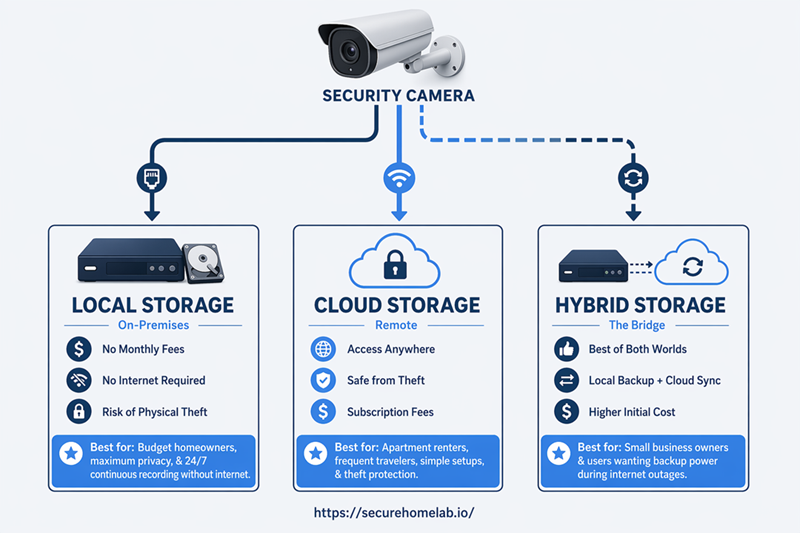
While the graphic above gives you a broad overview, use the breakdown below to find your specific scenario and see exactly which storage type matches your needs.
| Situation | Recommended Storage | Key Security Benefit |
| Privacy-focused homeowner | Local or Hybrid | Keeps more footage under your control |
| Budget-conscious homeowner | Local | Reduces or avoids monthly storage fees |
| Frequent traveler | Cloud or Hybrid | Easier remote access and off-site backup |
| User wanting simple setup | Cloud | Less equipment to manage |
| Small business owner | Local or Hybrid | Better retention, review, and backup options |
| User worried about theft | Cloud or Hybrid | Footage may survive if equipment is stolen |
| User wanting 24/7 recording | Local or Hybrid | Continuous recording is often easier locally |
| Apartment renter | Cloud or Hybrid | Easier setup with less permanent equipment |
| User with unreliable internet | Local or Hybrid | Local recording may continue during outages |
| Indoor camera privacy concerns | Local or Hybrid | Reduces unnecessary cloud exposure for sensitive areas |
Camera storage is only one part of a security system. If you are still deciding whether you need cameras, sensors, alarms, monitoring, or a DIY setup, start with our beginner-friendly guide to home security systems explained.
Small businesses often need a different balance of retention, remote access, user permissions, and backup. If you are choosing cameras for a shop, office, clinic, or workplace, see our guide to the best security cameras for small business.
Questions to Ask Yourself Before Choosing
- Do I want access to footage while away from the property?
- How important is avoiding monthly fees?
- Am I more concerned about privacy or convenience?
- Would I want footage backed up if a camera were stolen?
- Do I prefer managing my own equipment or having it managed for me?
- Will I review footage often or only when something happens?
- Is this for a home or business?
- How comfortable am I managing storage hardware?
- Who else will have access to the camera account or app?
- How long do I need footage to be saved?
Frequently Asked Questions
If Local Storage Is More Private, Isn’t It Always Better?
Not necessarily.
Privacy is important, but reliability, accessibility, backup protection, and convenience also matter.
The best choice depends on which risks concern you most.
If Cloud Storage Can Be Hacked, Why Would Anyone Use It?
Cloud storage has risks, but so does local storage.
Most cloud-related security problems can be reduced through strong passwords, two-factor authentication, firmware updates, and reputable providers.
Can Local Cameras Work Without WiFi?
Many can record locally without internet access.
However, remote viewing, alerts, app features, and updates may still require internet connectivity.
Is Cloud Storage Just a Way to Force Subscriptions?
Sometimes subscriptions fund useful services such as remote access, backup storage, alerts, and cloud infrastructure.
The question is whether those services provide enough value for your needs.
Is Hybrid Storage Usually the Best Choice?
Not always.
Hybrid storage is often attractive because it balances multiple concerns, but simpler local-only or cloud-only systems may be better depending on your priorities.
Final Thoughts
Local storage and cloud storage solve different worries.
Cloud storage is often about convenience, accessibility, and backup.
Local storage is often about ownership, privacy, and control.
Hybrid storage often helps when you are trying to solve more than one worry at the same time.
The best storage strategy is not the one with the most features.
It is the one that fits your priorities, your comfort level, and the way you actually use your security system.