
Many people assume all security cameras record continuously 24/7.
But in reality, many modern cameras only record:
- motion events
- alerts
- or short clips
So, do you need 24/7 recording for security cameras? How do you know which type of recording you actually need?
The answer depends on:
- your property
- your risk level
- and how you plan to use your security system.
This guide explains the differences between 24/7 recording and motion-based recording in simple terms so you can choose the right setup for your home or small business.
Quick Answer: Do You Need 24/7 Recording?
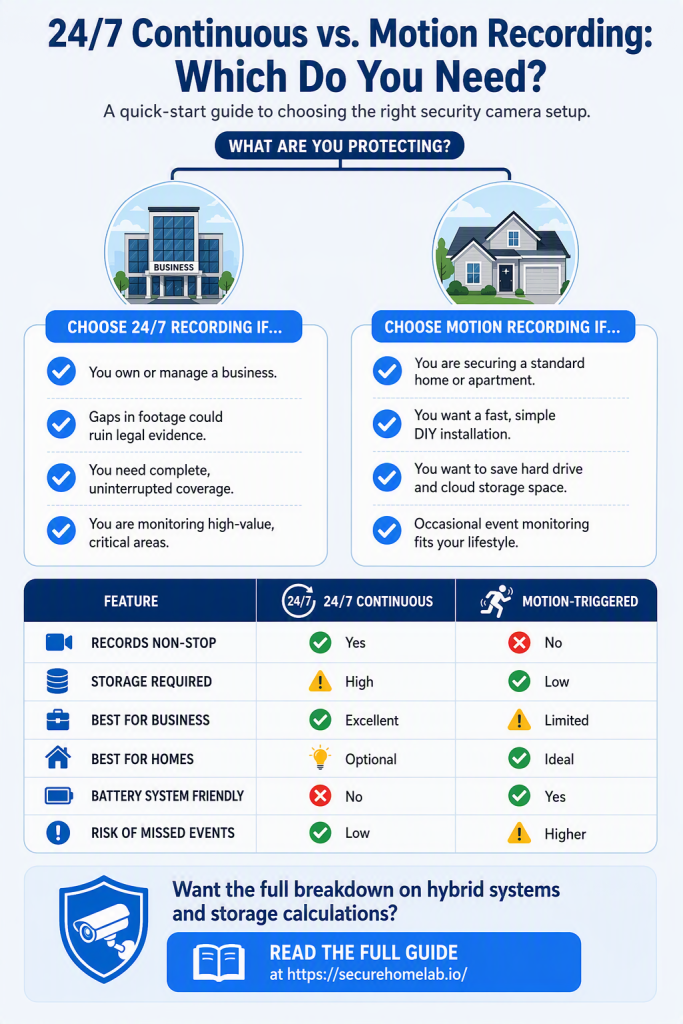
- Choose 24/7 recording if:
- you own a business
- need reliable evidence
- want complete coverage
- monitor important areas continuously
- Choose motion recording if:
- you want simpler setup
- want to save storage
- only need occasional monitoring
- are securing a small home setup
| Feature | 24/7 Recording | Motion Recording |
| Records continuously | Yes | No |
| Storage usage | High | Lower |
| Best for businesses | Excellent | Limited |
| Best for homes | Sometimes | Often ideal |
| Battery-friendly | No | Yes |
| Missed event risk | Low | Higher |
👉 Many homeowners are happy with motion recording, while businesses often benefit from continuous recording.
What Is 24/7 Recording?
24/7 recording means the camera records continuously all day and night.
This is common with:
- PoE camera systems
- NVR systems
- wired business setups
Instead of only saving clips when motion is detected, the system constantly records footage.
👉 If you’re completely new to security systems, our guide to home security system basics explains how cameras, alarms, sensors, and storage work together.
What Is Motion Recording?
Motion recording only saves footage when:
- movement is detected
- a person appears
- a vehicle passes
- or another trigger occurs
This is common with:
- WiFi cameras
- battery-powered cameras
- smart home systems
Motion recording helps:
- save storage space
- reduce footage review time
- extend battery life
Why Businesses Often Need 24/7 Recording
Many businesses prefer continuous recording because it:
- captures everything
- reduces missed events
- provides stronger evidence
This matters for:
- retail stores
- offices
- warehouses
- restaurants
For example:
- customer disputes
- theft
- accidents
- employee incidents
may happen outside of motion-triggered events.
👉 Continuous recording helps avoid gaps in footage.
For more business-focused recommendations, see our guide to security cameras for small business
Why Many Homeowners Prefer Motion Recording
For many homes, motion recording is enough.
Homeowners often prioritize:
- easier installation
- lower storage use
- battery-powered flexibility
- simpler systems
Motion recording works especially well for:
- front doors
- driveways
- package monitoring
- occasional activity
Many modern cameras also use smart detection to identify:
- people
- vehicles
- pets
which helps reduce false alerts.
The Biggest Advantage of 24/7 Recording
The biggest advantage is simple:
👉 nothing is missed.
Even if:
- motion detection fails
- someone moves slowly
- activity happens outside trigger zones
the footage is still recorded.
This is one reason businesses and professional systems often prefer wired PoE setups.
The Biggest Disadvantage of 24/7 Recording
Continuous recording requires:
- more storage
- more bandwidth
- more equipment
It may also:
- cost more upfront
- require wired installation
For smaller homes, this level of recording is sometimes unnecessary.
How Much Storage Does 24/7 Recording Need?
24/7 recording uses much more storage than motion recording because the camera is saving video all the time.
- How much storage you need depends on:
- the number of cameras
- video resolution
- frame rate
- compression type
- how many days of footage you want to keep
For example, a 4K camera recording continuously will use much more storage than a 1080p camera recording only motion events.
This is why many continuous recording systems use an NVR with a hard drive. A small home system may only keep a few days of footage before older video is overwritten. A business may want 7, 14, or 30 days of video history.
If you only need to check occasional activity, motion recording can be much more efficient. But if you need reliable evidence, the extra storage required for 24/7 recording may be worth it.
Storage capacity is only part of the decision. You also need to decide whether footage should be stored locally, in the cloud, or both. Our local storage vs cloud storage guide explains the tradeoffs.
The Biggest Advantage of Motion Recording
Motion recording is:
- simpler
- more storage efficient
- easier to manage
Instead of reviewing hours of footage, you only review important events.
This is ideal for:
- homeowners
- apartments
- low-traffic areas
The Biggest Disadvantage of Motion Recording
The main risk is:
👉 missing important moments.
Motion detection is better today than it used to be, but it is not perfect.
Potential problems include:
- delayed recording
- missed triggers
- incomplete clips
- activity outside motion zones
This matters more in businesses or high-risk environments.
Is Hybrid Recording a Good Middle Ground?
Some security camera systems offer a middle ground between 24/7 recording and basic motion recording.
For example, some systems can record continuously but still mark motion events on the timeline. This lets you keep complete footage while making it easier to find important moments.
Other cameras may offer features like:
- pre-recording before motion is detected
- longer motion clips
- person or vehicle detection
- motion event markers
- scheduled recording
This can be useful if you want stronger coverage without reviewing hours of footage manually.
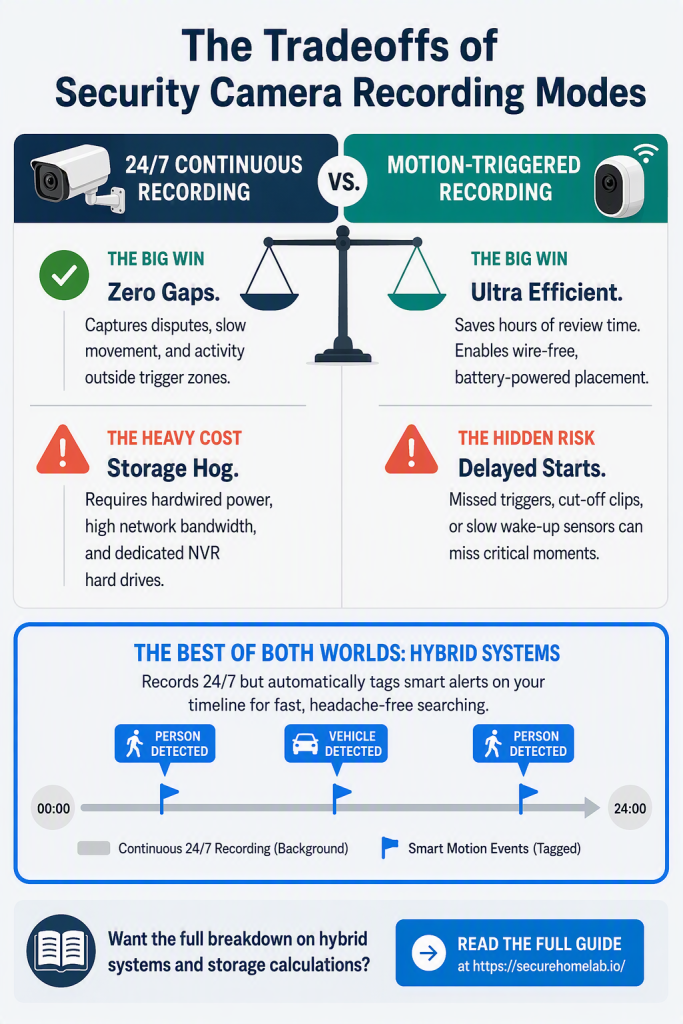
For many small businesses, continuous recording with motion markers is one of the best setups. For many homes, motion recording with smart detection may be enough.
Which Cameras Typically Support 24/7 Recording?
24/7 recording is most common with:
- PoE systems
- NVR systems
- wired cameras
Examples include:
- Reolink 4K PoE systems
- Reolink CX410 PoE
- Reolink Duo 3 PoE
If you’re comparing system types, see our guide to PoE vs WiFi security cameras.
Which Cameras Typically Use Motion Recording?
Motion recording is common with:
- battery-powered cameras
- WiFi cameras
- solar-powered cameras
Examples include:
- REOLINK Argus 4 Pro
- EufyCam 3
- TP-Link Tapo C120
Many of these systems work well for homes and lighter monitoring needs.
Do You Need a Subscription for 24/7 Recording?
Not always.
Some security cameras rely on cloud storage, which often requires a monthly subscription to save longer video history or access advanced features. Other systems use local storage, such as a microSD card, home base, or NVR.
If you want 24/7 recording without monthly fees, local storage is usually the better option. This is one reason many PoE and NVR systems are popular with small businesses and privacy-focused homeowners.
For home users, many no-subscription cameras use motion recording with local storage instead of continuous cloud recording. This can be a good option if you want simple monitoring without paying every month.
If avoiding monthly fees is a priority, see our guide to the security cameras without monthly fees for home-friendly options with local storage.
What Most People Get Wrong
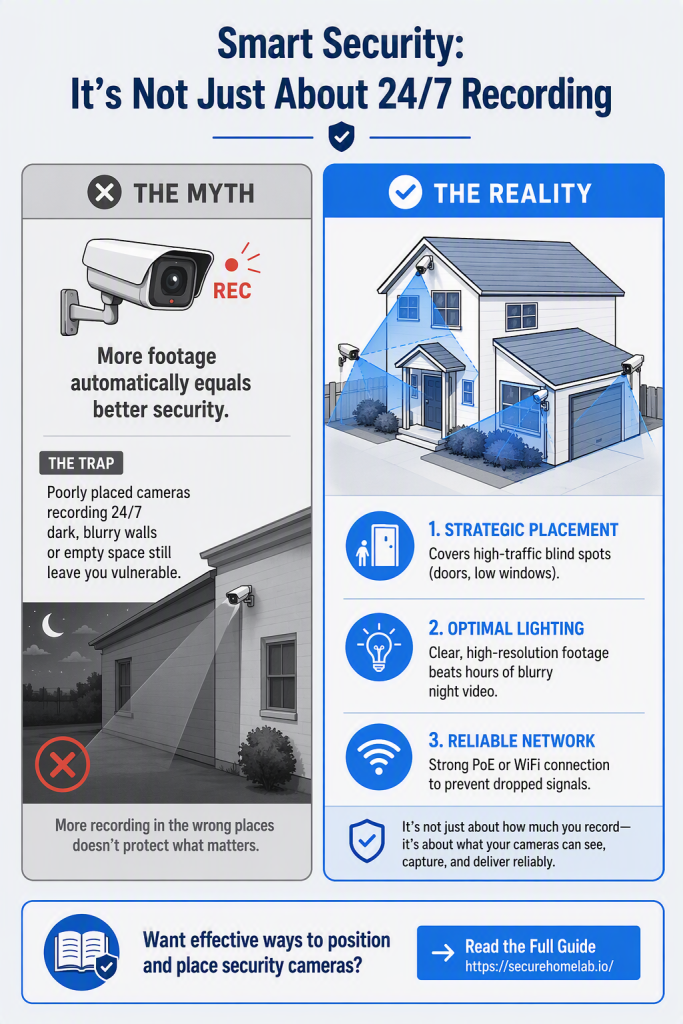
Many people assume:
- more recording automatically means better security
But in reality:
- good placement
- reliable cameras
- and clear footage
matter just as much.
For example, one well-placed camera can be more useful than several poorly positioned cameras.
For placement guidance, see our guide on where to place security cameras
Which Should You Choose?
Choose 24/7 recording if:
✅ you own a business
✅ you need reliable evidence
✅ you monitor important areas
✅ you want complete footage coverage
Choose motion recording if:
✅ you want a simpler setup
✅ you want lower storage use
✅ you are protecting a small home
✅ you prefer battery-powered cameras
A homeowner who mainly wants to watch the front door, driveway, or backyard may not need continuous recording. In that case, a motion-based WiFi camera or battery camera may be simpler and easier to maintain.
A small business owner has different priorities. If you operate a shop, office, restaurant, or warehouse, you may want a continuous record of what happened before, during, and after an incident.
A good rule of thumb is this:
- use motion recording for convenience
- use 24/7 recording for evidence
- use local storage if you want to avoid monthly fees
- use wired cameras if reliability is the top priority
Many people eventually use a hybrid approach, such as continuous recording for important areas and motion recording for lower-priority zones.
Frequently Asked Questions
Does 24/7 recording use more storage?
Yes. Continuous recording stores much more footage than motion recording, which is why many 24/7 systems use NVRs or larger hard drives.
Can WiFi cameras record 24/7?
Some WiFi cameras can record continuously if they are plugged into power, but many battery-powered models only use motion recording to preserve battery life.
Can battery cameras record 24/7?
Most battery-powered cameras do not record 24/7 because continuous recording would drain the battery too quickly. They usually rely on motion detection to save power.
If you want 24/7 recording, a plug-in WiFi camera, PoE camera, or NVR system is usually a better choice.
Is motion recording enough for home security?
For many homeowners, yes. Motion recording works well for front doors, driveways, and general home monitoring.
Why do businesses prefer continuous recording?
Businesses often need complete footage for:
- theft
- disputes
- liability protection
- employee incidents
Continuous recording helps avoid missed events.
Does 24/7 recording require internet?
No. Many local NVR systems can continue recording even if the internet connection goes down.
Does 24/7 recording slow down WiFi?
Continuous recording can use more bandwidth than motion recording, especially with multiple cameras. This is one reason wired PoE systems are often preferred for larger setups.
Final Thoughts
24/7 recording and motion recording can both work well.
The best choice depends on:
- your property
- your risk level
- your storage preferences
- and how important complete footage coverage is to you.
For many homes, motion recording is enough. For businesses or high-priority areas, continuous recording is often worth the extra storage and setup requirements.