
If you’ve been researching home security cameras, you’ve probably noticed something frustrating:
Most “affordable” cameras quickly become expensive once you add monthly subscription fees.
$3/month might not sound like much — but over a few years, it adds up fast.
More importantly, some people simply don’t want their footage stored in the cloud.
If you’re looking for no subscription security cameras, this guide compares the best options that work without monthly fees — while still being reliable and easy to use.
Disclosure: This article may contain affiliate links. If you purchase through these links, I may earn a small commission at no additional cost to you.
If you want a quick comparison:
| Camera | Image | Best For | Storage | Price |
|---|---|---|---|---|
| EufyCam 3 (S330) | 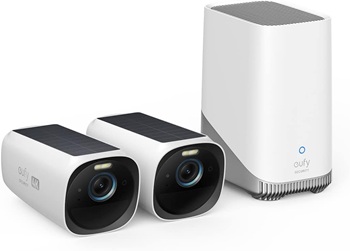 | Best Overall | Local (HomeBase) | |
| TP-Link Tapo C120 | 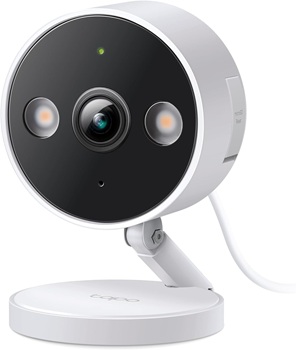 | Budget Indoor | Local (SD card) | |
| REOLINK Argus 4 Pro | 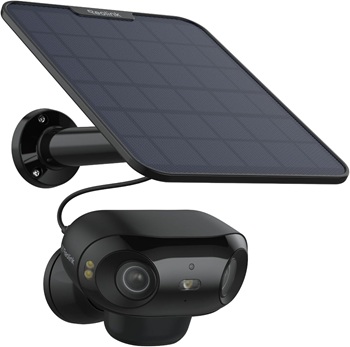 | Best Value | Local (SD card) |
- Best Overall (No Subscription): EufyCam S330
- Premium Indoor Camera: Eufy Indoor Cam S350
- Best Budget Indoor: TP-Link Tapo C120
- Best Outdoor / Performance: REOLINK Argus 4 Pro
These all work without required monthly fees, but each fits a different situation.
👉 Want the easiest no-subscription setup? Start with the EufyCam 3 (S330) — it’s the best all-around option for most homes.
Why Choose a Security Camera Without a Subscription?
Many homeowners are surprised to learn that some security cameras require a monthly fee just to unlock basic features.
Here’s why more people are choosing cameras with no subscription:
- No monthly fees – Pay once and avoid ongoing costs
- More privacy – Footage is stored locally, not in the cloud
- Full feature access – Motion detection, alerts, and recordings work without paying extra
- Better long-term value – Ideal for homeowners who want a simple, predictable setup
👉 If you prefer a one-time purchase instead of a recurring bill, these cameras are often the best choice.
⚠️ What “No Subscription” Actually Means
Not all “no subscription” cameras are equal.
Here’s the simple breakdown:
✔ True No Subscription
- Stores video locally (SD card or base station)
- No required monthly plan
- Full features available without paying
⚠ Optional Subscription
- Works without a plan
- But some features (AI detection, extended storage) may be locked
❌ Subscription Required
- Recording doesn’t work without paying monthly
👉 In this guide, we focus only on the first two.
Avoiding monthly fees often means relying more heavily on local storage. If you’re comparing local recording, cloud storage, and hybrid approaches, see our guide to local storage vs cloud storage for security cameras.
If privacy is one of your concerns, you may also want to read our guide on can security cameras be hacked, which explains the difference between local storage, cloud accounts, and common security risks.
✔ What to Check Before Buying
Before choosing a no-subscription camera, always confirm:
- How footage is stored (local vs cloud)
- Whether local storage is included or sold separately
- Which features work without a subscription
- Whether extra hardware (SD card or base station) is required
👉 For most homeowners, the best choice is a camera that uses local storage and still delivers everyday features without pushing you into a monthly plan.
🏆 Best Security Cameras Without Subscription
🔍 Quick Comparison
| Camera | Best For | Storage | Ease of Use | Check Price | Quick Verdict |
| EufyCam 3 (S330) | Privacy + full home setup | Local (HomeBase) | ⭐⭐⭐⭐☆ | Best overall long-term system | |
| Eufy Indoor Cam S350 | Indoor / baby monitoring | Local (SD card) | ⭐⭐⭐⭐⭐ | Best indoor flexibility | |
| TP-Link Tapo C120 | Budget beginners | Local (SD card) | ⭐⭐⭐⭐☆ | Cheapest way to start | |
| REOLINK Argus 4 Pro | Simple outdoor setup | Local (SD card) | ⭐⭐⭐⭐⭐ | Easiest plug-and-play option |
👉 Want the easiest setup with no monthly fees? The EufyCam 3 (S330) is a strong all-around choice for most homes.
🥇 Best Overall: EufyCam 3 (S330)
Why it stands out:
- Local storage (no monthly fees)
- Strong battery life
- Good video quality
- Built-in AI detection (no subscription required)
Best for:
- Homeowners who want a reliable, long-term system
- Families who care about privacy
Watch out for:
- Higher upfront cost
- Requires a base station
👉 If I were setting up a system for my own home and wanted to avoid subscriptions completely, this is where I would start.
🏠 Best Indoor Camera: Eufy Indoor Cam S350
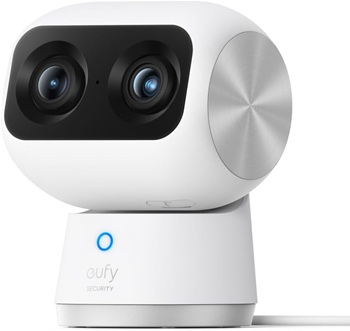
Why it stands out:
- Affordable
- Pan & tilt coverage (covers entire room)
- Local storage (SD card)
Best for:
- Baby monitoring
- Indoor security
- Pet monitoring
Watch out for:
- Needs to be plugged in
- Indoor use only
👉 This is a strong alternative to traditional baby monitors — especially if you want more flexibility.
💰 Best Budget Option: TP-Link Tapo C120
Why it stands out:
- Very low upfront cost
- Solid video quality for the price
- Local storage supported
Best for:
- Beginners
- Testing a system before upgrading
Watch out for:
- Limited multi-user camera sharing
- Wired power only – require an outlet near the mounting location
👉 Good starting point — but not a long-term “premium” solution.
⚡ Best Outdoor / Performance: REOLINK Argus 4 Pro
Why it stands out:
- True local storage focus
- Better image quality (4K, dual-lens)
- Clean app experience
Best for:
- Homeowners who want easy outdoor setup
- Beginners who want local storage
- Front door, driveway, backyard, or side-yard coverage
Watch out for:
- Battery cameras need charging
- Less seamless multi-camera management compared to Eufy
👉 Best if you value simplicity over customization.
🧠 How to Choose the Right One
Instead of asking “Which is best?”, ask:
1. Do you care about privacy?
→ Go with Eufy (local storage)
2. Are you on a tight budget?
→ Start with TP-Link Tapo C120
3. Do you want simple setup?
→ REOLINK Argus 4 Pro is easiest
4. Are you monitoring indoors (baby/pets)?
→ Eufy Indoor Cam
If you’re new to security systems, it helps to understand the basics of how everything works. See our guide to home security system basics.
🏡 Real-World Setup Example
If I were setting up a simple, no-subscription home system, I would do:
- 2 × EufyCam 3 (front + backyard)
- 1 × Eufy Indoor Cam (inside monitoring)
This setup:
- Covers key entry points
- Avoids monthly fees
- Keeps footage private
🛠 Installation Tips (Important)
Even the best camera won’t help if placed poorly.
Start with:
- Front door (highest priority)
- Back/side entrance
- Main indoor entry point
A good front-door setup should:
- Capture faces clearly (not just movement)
- Show the approach to your door, not just the doorway
- Avoid being mounted too high, which can make identification difficult
👉 See full placement guide here: Where to Place Security Cameras (Complete Guide)
👉Choosing a camera with local storage and no required subscription can give you more control, but privacy still depends on how the camera is configured. Before going live, use our guide to set clear privacy boundaries for your security camera.
🔄 What Most People Get Wrong
- Buying too many cameras upfront
- Ignoring storage limits
- Not thinking about placement
- Choosing based on specs instead of usability
Start simple. Expand later.
🧠 How We Chose the Best Cameras
We selected these cameras based on:
- Ability to function without a required subscription
- Availability of local storage options
- Real-world ease of use (setup, app reliability)
- Overall value for the price
Our goal is to recommend cameras that work well for everyday homeowners — not just technical users.
Frequently Asked Questions
Are there security cameras with no monthly fee?
Yes. Many cameras offer local storage (SD card or base station), allowing you to record and view footage without a subscription.
What’s the downside of no-subscription cameras?
You may miss advanced cloud features like extended video history or AI-based alerts—but many modern cameras include these locally.
Do no-subscription cameras still send alerts?
Yes. Most send motion alerts directly to your phone through a mobile app.
✅ Final Recommendation
If you want the best long-term value without subscriptions:
👉 Go with EufyCam 3 (S330)
If you want cheap and simple to start:
👉 Try TP-Link Tapo C120
If you want easy setup with minimal effort:
👉 Choose REOLINK Argus 4 Pro
🎯 Bottom Line
You don’t need a monthly subscription to build a reliable home security system.
Focus on:
- Local storage
- Practical placement
- Simple setup
That’s what actually makes a system effective.
👉 For most homeowners, the EufyCam 3 (S330) offers the best balance of ease of use, features, and long-term value.