
If you’ve recently installed a security camera, you’ve probably opened the app and been greeted by a long list of settings:
- Privacy Zones
- Activity Zones
- Motion Detection
- Shared Users
- Audio Recording
- Recording Schedules
- Geofencing
- Facial Recognition
- Cloud Sharing
- Smart Notifications
For many people, that moment feels surprisingly overwhelming.
Which settings actually matter?
Which ones can wait?
And how do you know whether changing a setting will make your camera more private—or simply more complicated?
The good news is that you do not need to understand every feature before using your camera well.
Most privacy settings are simply different ways of answering a few practical questions about what your camera should do—and just as importantly, what it should not do.
Different camera brands may use different names for these features, but the decisions behind them are usually the same.
This guide will help you think about those decisions before you touch a single toggle.
Quick Answer
Many people assume privacy settings are a collection of technical features.
In reality, they are mostly about giving your camera appropriate boundaries.
The goal is not to enable every privacy feature available.
The goal is to give your camera clear boundaries so it can do its job without recording, sharing, or alerting more than necessary.
Before changing any settings, start with one foundation question:
What is this camera’s job?
Once you can answer that, the remaining decisions become much easier.
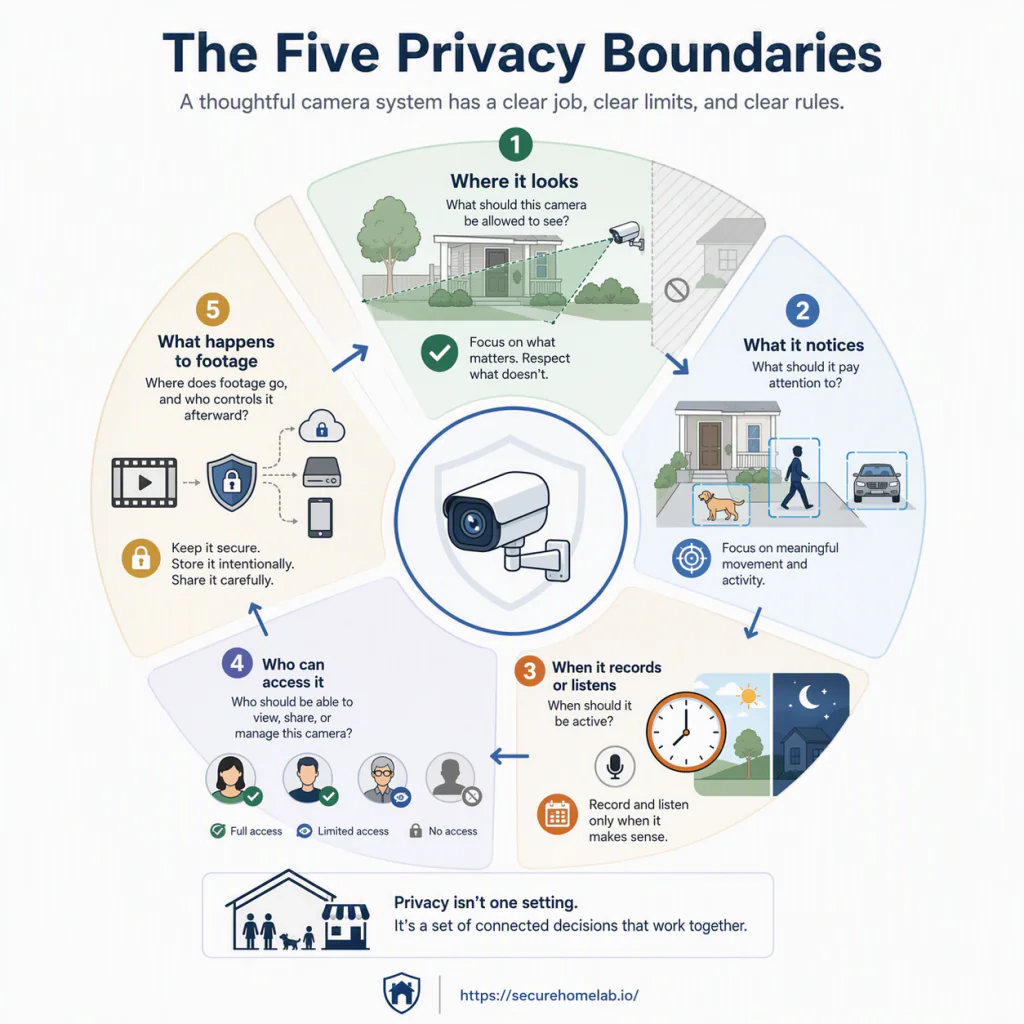
They usually fall into five simple boundary questions.
| Boundary Decision | What You’re Really Deciding |
| What should this camera be allowed to see? | What belongs inside—or outside—its view? |
| What should it pay attention to? | Which movement actually deserves attention? |
| When should it record or listen? | When should it be active? |
| Who should have access? | Who should be able to view, share, or manage this camera? |
| What happens after footage is captured? | Where does footage go, and who controls it afterward? |
Think of these as the five boundaries that shape your camera’s behavior.
Everything else builds from them.
Start With the Camera’s Job
Before adjusting any privacy setting, ask yourself one simple question:
What is this camera supposed to do?
That question is more important than any individual feature in the app.
A front-door camera, a nursery camera, a backyard camera, and a small-business reception camera all have different jobs.
Because they have different jobs, they should also have different privacy settings.
Trying to configure every camera the same way often creates unnecessary alerts, captures more than intended, or makes people feel uncomfortable in their own home or workplace.
A security camera should have a clear job, clear limits, and clear rules for who can see through it.
Good privacy settings do not make cameras watch more.
They help cameras watch more intentionally.
Camera Jobs Look Different
| Camera Location | Main Job | Biggest Privacy Question | Settings That Usually Matter Most |
| Front door | Monitor visitors and deliveries | Am I recording neighbors or the street unnecessarily? | Placement, privacy zones, activity zones |
| Driveway | Protect vehicles and property | How do I reduce unnecessary alerts? | Camera angle, motion sensitivity, activity zones |
| Backyard | Monitor private outdoor space | What should be excluded from view? | Placement, privacy zones |
| Living room | Check pets or indoor activity | Should this record while people are home? | Recording schedules, audio, privacy mode |
| Nursery or pet camera | Check on a child or pet | Who should be able to view this camera? | Shared users, permissions, schedules |
| Small business reception | Monitor entrances and customer areas | Who needs access to recordings? | User permissions, retention, audio review |
Notice something important.
The camera’s location does not determine its settings by itself.
Its job does.
Once you understand the job, the privacy decisions become much easier.
That brings us to the first boundary.
What Should Your Camera Be Allowed to See?
A security camera should help protect what matters without capturing more than necessary.
In many cases, the best privacy improvement is not a software setting at all.
It is pointing the camera at the right place.
Camera placement is the first privacy setting, even though it is not inside the app.
If you have not chosen your camera locations yet, our security camera placement guide can help you start with the physical setup before relying on app-based controls.
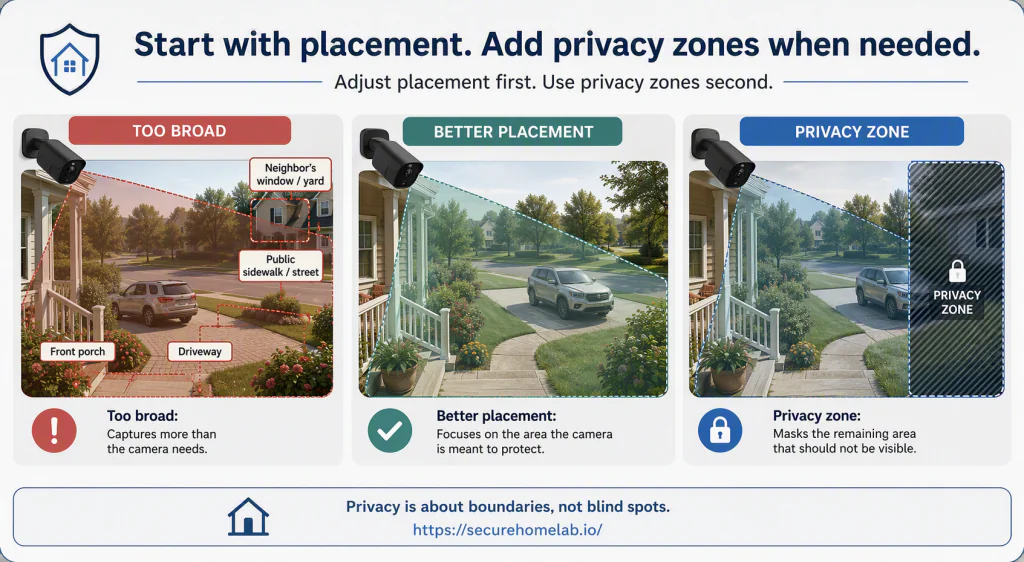
A camera with clear visual boundaries is easier to trust because it records what you intend, avoids what it does not need, and reduces unnecessary privacy concerns from the beginning.
Camera Placement Comes First
Before opening your camera app, take a moment to look at what the camera can actually see.
Many privacy concerns begin long before anyone changes a setting.
They begin with where the camera is pointed.
Your camera should focus on the area it is responsible for protecting—not everything its lens happens to capture.
A front-door camera may unintentionally include part of a neighbor’s window.
A driveway camera may capture more of the street than necessary.
An indoor camera may overlook areas of the home that were never meant to be monitored.
Whenever possible, solve those problems physically first.
Sometimes moving the camera a few inches, adjusting its angle, lowering its height, or narrowing its field of view creates a better privacy outcome than any software setting can.
This approach usually creates cleaner recordings, reduces unnecessary privacy concerns, and can make later alert settings easier to manage.
A simple guideline is worth remembering:
Reposition the camera first. Use privacy zones for areas that still appear in the frame.
Privacy Zones
Sometimes camera placement alone cannot solve every privacy concern.
Perhaps the perfect viewing angle still includes part of a neighbor’s window, a section of the sidewalk, or an area inside your own home that does not need to appear in recordings.
This is where privacy zones become useful.
A privacy zone allows you to block or mask a selected area within the camera’s view.
In simple terms, it tells the camera:
“This part of the scene should not be visible or usable.”
Depending on your camera system, privacy zones may help limit areas that appear in live view, recordings, downloaded clips, or shared footage.
Common examples include:
- A neighbor’s window.
- Part of an adjoining yard.
- A public sidewalk beyond your property.
- A private doorway inside your home.
- A workspace that does not need to be monitored.
The point is not to hide important evidence.
The point is to avoid capturing areas the camera does not need for its job.
One important note:
Privacy zone behavior varies between camera brands.
Before relying on a privacy zone, check whether it applies to:
- Live view
- Recordings
- Downloaded clips
- Shared videos
- Smart display views
- Notification previews or thumbnails
Different systems handle these features differently, so it is worth understanding how your particular camera works.
Privacy Zones Are Not the Same as Activity Zones
Privacy zones and activity zones are often confused because both involve drawing boxes on the screen.
They solve different problems.
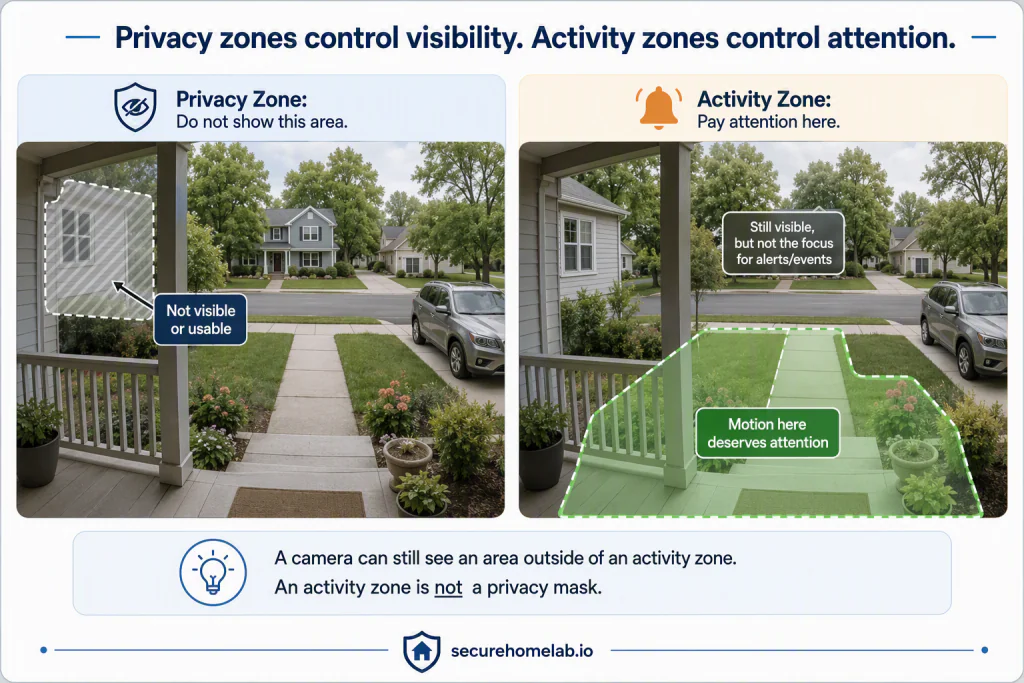
Privacy zones are about visibility.
They help limit what is visible or usable by masking parts of the scene that do not need to be included.
Activity zones are about attention.
They tell the camera which areas deserve attention when motion occurs.
Although the tools may look similar inside the app, they answer completely different questions.
Privacy zones help decide:
“What should this camera be allowed to see?”
Activity zones answer a different question:
“What should this camera pay attention to?”
Once you’ve decided what the camera should be allowed to see, the next step is deciding what deserves its attention.
Not every movement needs an alert.
Not every part of the image deserves the same level of attention.
The next settings help you teach the camera what actually matters.
What Should Your Camera Pay Attention To?
Once you’ve decided what your camera should be allowed to see, the next step is deciding what deserves its attention.
Those are not the same decision.
A camera may have a perfect view of your front porch, driveway, or backyard, but that does not mean every movement within that view deserves the camera’s attention.
This is where many people begin feeling frustrated with a new security camera.
The camera is not necessarily “wrong.”
It is simply paying attention to more than it needs to.
The goal is not to make your camera notice everything.
The goal is to help it notice what actually matters.
Activity Zones
One of the simplest ways to reduce unnecessary alerts is deciding where motion is worth noticing.
That is the purpose of activity zones.
Activity zones let you tell the camera where motion deserves its attention.
Instead of treating every part of the image equally, you choose the areas that matter for your situation.
For example:
- A front-door camera may only need to pay attention to your porch and walkway—not the busy street beyond them.
- A driveway camera may focus on your vehicles rather than passing traffic.
- A backyard camera may monitor your gate instead of trees moving in the wind.
- An indoor camera may focus on a doorway or pet area instead of reacting every time sunlight shifts across the room.
- A small business entrance may prioritize customers entering the doorway rather than activity on a neighboring sidewalk.
Notice what activity zones do not change.
They do not change what the camera can see.
They change what the camera considers important.
Depending on the camera system, an activity zone may reduce alerts, motion events, or motion-triggered recordings outside the selected area. It usually does not hide those parts of the scene from the live view or permanently remove them from the camera’s image. For that, you need better camera placement or a privacy zone.
That small distinction makes activity zones one of the most practical settings for reducing unnecessary alerts while helping the camera stay focused on the areas that matter most.
Motion Sensitivity and Similar Detection Controls
After deciding which areas deserve attention, the next question is how easily the camera should react to movement there.
Your app may give you a sensitivity slider, a detection control, or another way to fine-tune how readily the camera responds to movement. The labels vary, but the goal is the same: reduce reactions to movement that does not matter.
If sensitivity is set too high, your camera may react to things that are not meaningful, such as:
- leaves blowing across the yard
- rain or snow
- changing shadows
- insects near the lens
- headlights from passing cars
If sensitivity is set too low, the camera may miss events you actually wanted to know about, such as:
- someone approaching your front door
- a package delivery
- a vehicle entering your driveway
- a person walking through your gate
The goal is not maximum sensitivity.
It is meaningful sensitivity.
A camera that generates constant false alerts is often ignored.
A camera that misses important events is not doing its job.
The right balance depends on where the camera is installed and what you are trying to protect.
Different Brands Use Different Names
Do not worry if your camera app uses different labels from the ones used here.
One brand may call them Activity Zones, while another uses Motion Zones, Detection Areas, or something similar.
The labels vary, but the decision is the same:
Which parts of the scene deserve my camera’s attention?
Some cameras also offer person, vehicle, or package detection. Those features can further refine what the camera notices, but you do not need to master them before getting the basic zones and sensitivity right.
A Practical Example
Imagine your front-door camera captures:
- your porch
- your front steps
- part of your driveway
- the public sidewalk
- a section of the street
In the previous section, you decided what the camera should be allowed to see. Perhaps you adjusted the camera slightly and added a privacy zone to exclude a neighbor’s window.
Now you face a different question.
Should the camera react every time someone walks down the sidewalk?
Probably not.
Instead, you might create an activity zone that focuses only on your porch and front walkway.
The camera still has a useful view of your property.
It simply pays attention to the areas that matter most.
That is exactly what activity zones are designed to accomplish.
You Do Not Need to Get It Perfect Immediately
If you’re just getting started, do not worry about making these settings perfect on the first day.
Start with the obvious distractions.
If your camera constantly alerts you about passing traffic, moving branches, or people walking their dogs across the street, adjust its attention gradually until the alerts become meaningful instead of constant.
Small adjustments usually work better than dramatic ones.
Your goal is not to eliminate every alert.
Your goal is to trust that, when your camera gets your attention, there is a good reason.
Once you’ve decided what your camera should see and what deserves its attention, the next question becomes much more personal.
Even when the camera notices something important…
Should it always be recording?
Or should it record only at certain times, listen for audio, or remain inactive when people are home?
The next section explores one of the most important privacy decisions in the entire article:
When Should Your Camera Record—or Listen?
When Should Your Camera Record—or Listen?
By now, you’ve already answered two important questions.
You’ve decided:
- what your camera should be allowed to see, and
- what deserves its attention.
The next question is more personal.
The question is not whether your camera can be active all the time. It is whether it needs to be.
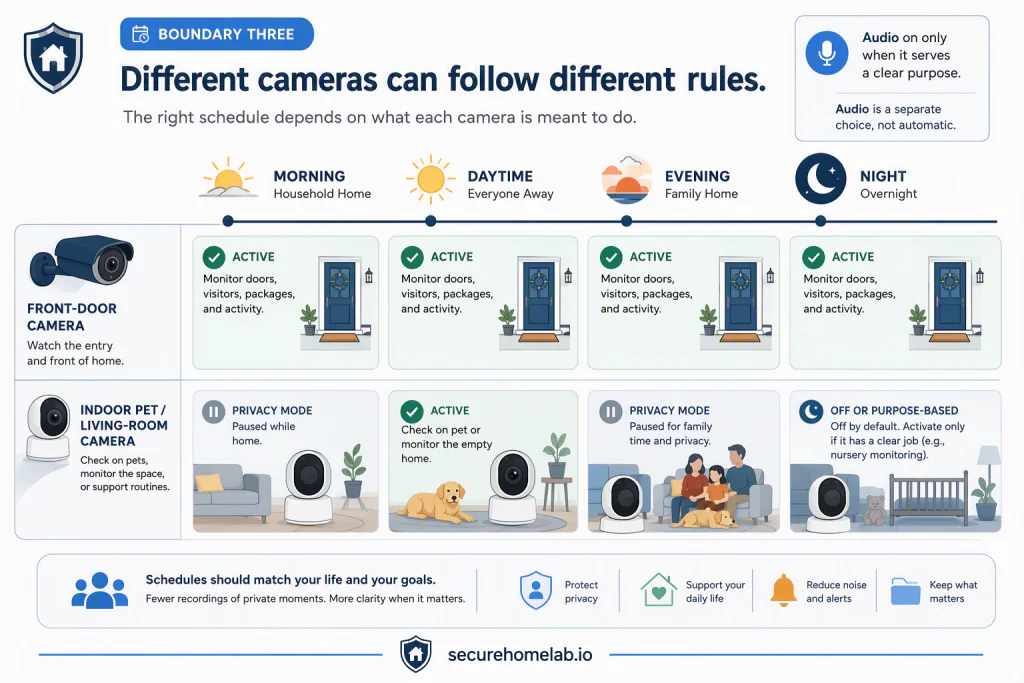
Different camera systems define “active” in different ways. Some record continuously, some save only motion-triggered events, and others offer recording schedules, Home/Away routines, privacy modes, or similar controls. The details vary, but the privacy question stays the same:
When should this camera be present in this space?
For many people, this is where a security camera stops feeling like a piece of technology and starts feeling like part of everyday life.
A front-door camera usually watches a boundary around your home.
An indoor camera may watch the life happening inside it.
Neither approach is automatically right or wrong.
The goal is not to record as much as possible.
The goal is to record at the times that best match your needs and your comfort level.
Recording Schedules Create Boundaries
Many camera systems let you create recording schedules, Home/Away routines, or similar rules that match the way you actually use the space.
Instead of behaving the same way every hour of every day, the camera follows boundaries that fit its purpose.
For example:
- A front-door camera may remain active throughout the day because it protects an entry point.
- A nursery camera may monitor overnight but not during everyday family activities.
- A pet camera may become active only after everyone leaves the house.
- A small business camera may follow different routines during business hours and after closing.
Notice the pattern.
Each camera follows the schedule that matches its job.
Recording schedules are not about making cameras less useful.
They are about making them feel more intentional.
Audio Recording Deserves Extra Thought
Video shows what happened.
Audio often reveals much more.
It may capture:
- private conversations,
- children’s voices,
- phone calls,
- visitors,
- and everyday moments that were never intended to become recordings.
That does not mean audio recording is inherently bad.
It simply deserves more thought than many people give it.
Before enabling audio, ask yourself two questions:
Would audio genuinely help this camera do its job?
Would people reasonably expect audio to be recorded here?
The first question is about purpose.
The second is about the people sharing the space.
For a front-door conversation with a delivery driver, your answer may be yes.
For a living room where your family spends each evening together, your answer may be different.
Some cameras also separate microphone controls, recorded audio, and two-way talk. The exact options vary, but the same two questions still apply.
For businesses and shared workplaces, audio recording may also raise additional legal or workplace-policy considerations. Before enabling it, check the rules that apply where you operate.
Good privacy decisions are rarely about enabling every available feature.
They are about choosing the features that genuinely serve a purpose.
Indoor Cameras Often Need Different Rules
Many people discover that indoor cameras feel different from outdoor cameras.
The reason is not complicated.
Indoor cameras record everyday life.
Because of that, the question usually changes.
Instead of asking:
“Where should this camera point?”
People begin asking:
“When do I actually want this camera watching?”
For many homes, the answer is not “always.”
You may prefer an indoor camera that:
- records while the house is empty,
- pauses during family time,
- monitors a nursery overnight,
- or activates only under specific circumstances.
A helpful camera should fit naturally into daily life—not make people feel like they are constantly being watched.
Privacy Mode and Visible Signals Build Trust
Software controls are important.
Visible reassurance can be just as important.
Depending on the camera, that reassurance may come from a privacy mode, a physical shutter, a microphone mute control, a recording indicator, or another visible signal that shows when the camera is active.
These features are not necessary for every home.
But they can be especially reassuring in shared spaces, around children, with caregivers or guests, or whenever more than one person lives with the camera.
A camera being “off” inside an app may reassure the account owner.
A visible privacy cue can reassure everyone in the room.
Visible signals do not replace thoughtful privacy settings.
They help the people around the camera understand and trust them.
A Practical Example
Imagine you install two cameras on the same day.
One watches your front porch.
The other watches your living room so you can check on your dog while you’re away.
Should both cameras behave the same way?
Probably not.
Your front-door camera may reasonably remain active throughout the day.
Your indoor camera may only need to become active after everyone leaves for work.
The cameras have different jobs.
Because they have different jobs, they deserve different recording boundaries.
That simple idea often makes privacy settings feel much less overwhelming.
Once you’ve decided:
- what your camera should see,
- what deserves its attention,
- and when it should be active,
one important question still remains.
Even thoughtfully configured cameras can create privacy concerns if the wrong people are able to access them.
The next section explores another important boundary:
Who Should Have Access to Your Camera?
Who Should Have Access to Your Camera?
By this point, you’ve already decided:
- what your camera should see,
- what deserves its attention,
- and when it should be active.
Now comes another important boundary.
Who should be allowed to look through it?
Unlike the previous settings, this boundary is not about what the camera does.
It is about the people you trust with what the camera sees.
Even a thoughtfully configured camera can become a privacy concern if access is shared too broadly or managed carelessly.
Good privacy is not only about recording responsibly.
It is also about sharing responsibly.
In many ways, this boundary comes down to trust—but trust with thoughtful limits.
Not just:
“Do I trust this person?”
Also ask:
- Does this person genuinely need access?
- Which camera do they need to see?
- What should they be allowed to do?
- How long should that access last?
Those questions help turn camera access from an afterthought into an intentional privacy boundary.
Sharing Camera Access Is Like Giving Someone a Spare Key
Sharing camera access is a little like giving someone a spare key to your home.
Most people think carefully before handing someone a physical key because it provides access to a private space.
Camera access deserves the same level of thought.
It allows someone to look into parts of your home, your business, or your daily routine—even when they are not physically present.
Sharing camera access means sharing a view into part of your daily life.
That does not mean you should never share access.
Family members, caregivers, pet sitters, trusted neighbors, contractors, and employees may all have legitimate reasons to use a camera system.
It simply means access should be shared thoughtfully and only with people who genuinely need it.
A person may need access to your front-door camera while you are away.
That does not necessarily mean they need access to indoor cameras, saved recordings, account settings, or the ability to invite additional users.
Trust does not have to mean unlimited access.
Different People May Need Different Levels of Access
Not everyone who uses your camera system needs the same permissions.
Some people only need to view a live camera.
Others may need to review recorded footage.
Only a small number of people should usually be able to change camera settings, add or remove users, or manage the account itself.
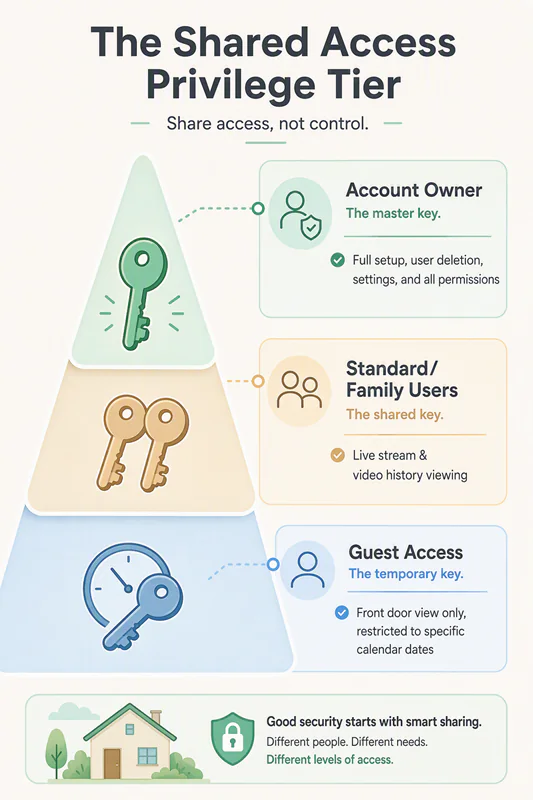
Depending on the system, permissions may include the ability to view live video, watch recordings, download clips, delete footage, share videos, change settings, or invite other users.
Whenever your camera system offers different permission levels, choose the smallest amount of access that allows someone to do what they actually need.
If your system allows per-camera permissions, use them.
Not everyone needs access to every camera.
For example, a caregiver may only need access to a nursery camera, while a trusted neighbor checking deliveries may only need to view your front-door camera.
An employee may need to monitor an entrance camera during a shift without needing permission to download footage, delete clips, change settings, or invite additional users.
Before sharing access, ask yourself two simple questions:
Does this person genuinely need access?
What is the smallest amount of access that lets them do what they need?
Giving appropriate access is often better than giving complete access.
Temporary Access Can Be the Better Choice
Sometimes people only need camera access for a short period of time.
A pet sitter may only need access while you’re traveling.
A house sitter may only need access during a vacation.
A contractor may only need access while work is being completed.
A temporary employee may only need access for a specific project or schedule.
Whenever possible, match the length of access to the reason it was shared.
When that need ends, review whether access should end as well.
Removing access is not about distrust.
It is simply part of maintaining thoughtful privacy boundaries as life changes.
Review Who Already Has Access
Sometimes the biggest privacy risk is not giving someone access. It’s forgetting they still have it.
People move.
Employees change roles.
Contractors finish projects.
Children grow older.
Household routines evolve.
As life changes, the people who once needed access may no longer need it.
Take a few minutes from time to time to review who can access your cameras.
A good time to perform an access review is:
- after moving into a home with existing cameras,
- after changing roommates, caregivers, or household routines,
- after an installer, contractor, or employee finishes work,
- after a move, breakup, or staffing change,
- after linking a new smart-home platform or account.
If someone no longer needs access, remove it.
If someone needs a different level of access than before, update their permissions.
Privacy settings should evolve as your household or business evolves.
💡 If You Moved Into a Home With Existing Cameras
Reset the cameras, change account passwords, remove old shared users, review linked smart-home accounts, and confirm where recordings are stored.
Do not assume that access changed hands simply because the property did.
A Practical Example
Imagine you are leaving town for a week.
A trusted neighbor agrees to collect your packages and make sure everything looks normal while you’re away.
They probably benefit from being able to check your front-door camera.
But do they also need to view your indoor cameras?
Should they be able to delete recordings or invite additional users?
If your system allows those permissions, probably not.
Their access should match the reason you shared it.
Thoughtful sharing is not about withholding trust.
It is about giving people the access they genuinely need — and no more.
Shared access is only one part of protecting camera access. Strong passwords, multi-factor authentication when available, and regular account reviews can also reduce the risk of unauthorized access. Our guide to whether security cameras can be hacked explains those risks and practical protections in more detail.
Once you’ve decided:
- what your camera should see,
- what deserves its attention,
- when it should be active,
- and who should have access,
one final privacy boundary remains.
What Happens After Footage Is Captured?
Every recording your camera creates has to go somewhere — and may appear in more places than you expect. The final privacy boundary is what happens after footage is captured: where it is stored, who can share it, and the other places it may appear.
What Happens After Footage Is Captured?
By now, you’ve decided:
✅ where your camera should look,
✅ what deserves its attention,
✅ when it should be active,
✅ and who should have access.
One final privacy boundary remains.
Every recording your camera creates has to go somewhere.
Some recordings stay on the camera itself.
Others are stored on a local recorder or memory card.
Some are uploaded to the cloud.
Others may appear on a phone, tablet, smart display, or another connected device.
A recording rarely exists in only one place.
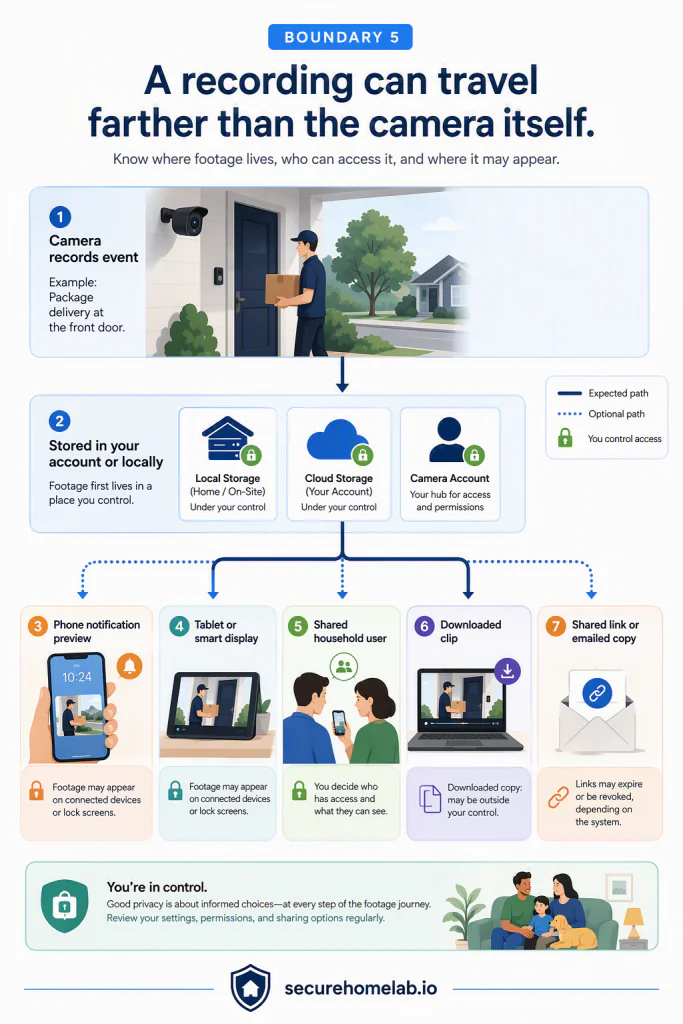
The moment it is created, it begins a journey through the devices, services, and people connected to your camera system.
Capturing footage is only the beginning of its privacy story.
👉 Understanding that journey helps you make better privacy decisions — not because every recording is sensitive, but because every recording deserves thoughtful handling.
A Recording Does Not Stop Affecting Privacy After It Is Created
Many people think about privacy while a camera is recording.
Fewer think about privacy after the recording already exists.
Yet this is when many important privacy decisions begin.
How long should the recording be kept?
Who can download it?
Who can share it?
Where else might it appear?
Deleting a recording removes one privacy concern.
Keeping it creates another responsibility.
The recording itself has become part of your digital life.
Privacy does not end when recording stops.
It continues for as long as that recording exists.
👉 If you inherited cameras with a home, confirm that recordings are connected only to accounts and storage you control.
Understand Where Your Recordings Are Stored
Where footage is stored affects more than convenience. It affects which devices, accounts, and services become part of the recording’s journey.
Different camera systems store recordings in different places.
Some use local storage, such as a microSD card or network video recorder (NVR).
Others store recordings in the cloud.
Some support both.
If you are deciding between the two, our guide to local vs. cloud camera storage compares the privacy, access, backup, and convenience tradeoffs in more detail.
Neither approach is automatically more private.
Each simply creates different responsibilities.
Local storage often gives you more direct control over where recordings remain.
Cloud storage may provide convenient backup, remote access, and easier sharing.
Understanding where your recordings are stored helps you make informed decisions about convenience, resilience, and privacy.
👉 The goal is not to choose one method because someone says it is “best.” The goal is to know where your footage lives, who can reach it, and what happens if the camera, storage device, or account is compromised.
Think Before Sharing Recordings
Sometimes sharing a recording makes perfect sense.
You might provide footage to a family member.
A neighbor.
Law enforcement.
Your insurance company.
Or a contractor investigating an incident.
Before sharing a recording, pause for a moment.
Ask yourself:
- Does this person genuinely need this recording?
- Does the recording include anyone else’s private activity?
- Am I sharing more than is necessary?
A short clip showing the relevant event may often be more appropriate than sharing hours of unrelated footage.
Thoughtful sharing protects not only your own privacy, but also the privacy of other people who appear in the recording.
👉 Depending on your system, you may be able to share a link, send a clip directly, or allow another user to download footage. Before doing so, check whether the link can expire, whether access can be revoked, and whether the recipient can save a copy.
👉 Once someone downloads a recording, your control over that copy may be limited. Deleting the original from your account does not necessarily delete a file another person has already saved.
Smart Displays, Connected Devices, and Notification Previews
Footage does not always stay inside your camera app. It may also appear on a phone, tablet, smart display, television, home hub, or lock-screen notification.
Many camera systems connect with other devices and services.
A motion alert may display a preview image on your phone.
A smart display may automatically show a live camera feed.
A voice assistant may open a camera when asked.
Cloud services may synchronize recordings across multiple devices.
Depending on your system, recordings or preview images may appear in more places than you expect.
That does not necessarily create a privacy problem.
It simply means those connected devices deserve the same thoughtful attention as the camera itself.
Understanding where footage may appear is just as important as understanding where it is stored.
Review Retention Settings From Time to Time
Keeping footage is not a one-time decision. It is a decision that continues for as long as the footage remains available.
A recording may be useful immediately after an event. Weeks or months later, it may simply be an old copy of someone’s arrival, conversation, workday, or family routine.
That is why retention settings matter. They help you decide how long recordings should remain part of your digital life.
Some camera systems automatically remove older recordings after a set period. Others continue recording until storage becomes full. Some cloud services allow you to choose how long recordings are kept.
Review your retention settings occasionally. Ask yourself:
- Do I still need recordings to remain this long?
- Does this match how I actually use my camera?
For a business, footage-sharing and retention decisions may also need to match your workplace policies and any rules that apply where you operate.
👉 Privacy is not only about deciding what to keep. It is also about deciding when it is reasonable to let things go.
A Practical Example
Imagine your front-door camera records a delivery driver leaving a package at your door.
First, the camera saves the event in your account. A notification preview appears on your phone, where someone nearby might see the image on your lock screen. Later, you open the clip from a tablet signed into the same account.
Your partner can also view it because they have shared access to the front-door camera. When the package goes missing, you download the relevant clip and send it to the retailer or insurance company.
At that point, the recording may exist in several places: in the camera account, on devices connected to that account, and in the downloaded copy you shared. Depending on the system, a shared link may expire or be revoked — but a file someone has already downloaded may be outside your control.
None of those steps is automatically wrong. The point is simply to understand that footage can travel beyond the camera itself. Once you see that journey clearly, you can make more intentional decisions about storage, sharing, and access.
The Five Boundaries Work Together
Privacy is often described as a collection of settings.
In reality, it is better understood as a collection of thoughtful decisions.
Where your camera looks.
What it notices.
When it records or listens.
Who can access it.
And what happens after footage is captured.
None of these boundaries stands alone. A carefully placed camera can still feel intrusive if it records at the wrong times. A well-timed indoor camera can still create privacy concerns if too many people can view it. Footage stored responsibly can still travel farther than intended if it is shared carelessly.
👉 Together, these five decisions help create a camera system with a clear job, clear limits, and clear rules. That is what makes a security camera feel less mysterious — and more predictable.
You do not need to master every advanced feature to get these basics right. Next, let’s look at the privacy features that can be useful, but do not need to be your starting point.
Which Advanced Privacy Features Can You Ignore for Now?
After working through the five privacy boundaries, you have already made the decisions that matter most.
Your camera has a clear job.
It knows what it should pay attention to.
It has clear rules for when it should be active.
The right people have access.
And you understand what happens after footage is captured.
That is already a thoughtful privacy setup.
If you have already worked through the five boundaries, you have addressed the privacy decisions that make the biggest day-to-day difference.
Many camera apps include additional features such as facial recognition, object labels, geofencing, automation rules, and highly detailed motion controls. These features can be useful, but they do not need to be your starting point.
Good privacy starts with clear boundaries, not advanced features.
The goal is not to use every feature your camera offers. The goal is to understand what each feature does before deciding whether it genuinely improves the way your camera works in your home or business.
A camera with a few well-chosen settings is often easier to understand, easier to maintain, and more respectful of everyday life than one with every option enabled.
Facial Recognition
Some camera systems can recognize familiar faces and identify individual people in notifications or recordings.
Facial recognition goes beyond noticing that a person is present. It attempts to identify who that person is.
For some households, this can be convenient. A camera may tell you that a family member arrived home instead of simply reporting that it detected a person.
For others, this feature may feel unnecessary or more personal than they prefer.
Neither choice is inherently right or wrong.
Before enabling it, ask yourself: Would knowing this person’s identity actually change what I do?
If facial recognition solves a problem you actually have, it may be worth considering. If not, your camera can still provide effective security without identifying individual people by name.
AI Detection and Smart Alerts
Many newer cameras can label motion as a person, vehicle, animal, package, or something else. These labels can reduce notification noise by helping the camera distinguish a delivery from a passing car or a pet from a visitor.
Smart labels refine your camera’s attention; they do not fix a camera that is pointed too broadly, reacting to the wrong area, or active at the wrong time.
AI works best when it supports good decisions—not when it replaces them.
Geofencing and Automation
Some camera systems can automatically change their behavior based on your phone’s location or other smart-home events.
For example, your indoor cameras might automatically arm when everyone leaves home and disarm when someone returns.
These automations can be helpful, but they also add another layer of decision-making.
Before enabling automation, make sure you understand exactly what will happen, when it will happen, and what exceptions might occur.
Predictable behavior is usually more valuable than complicated behavior.
Detailed Motion Controls
Many camera apps include extensive controls for motion sensitivity, object size, schedules, and other detection settings.
These tools are useful when they solve a specific problem, such as reducing false alerts from a busy sidewalk or preventing notifications from a tree that moves in the wind.
You do not need to adjust every slider simply because it is available.
If your camera is already noticing the right events at the right times, additional adjustments may not improve your experience.
Start With Purpose, Add Features Later
Advanced features become much easier to evaluate once your camera already has a clear role.
Instead of asking,
“Should I enable this feature?”
try asking,
“What problem would this solve?”
If the answer is clear, the feature may be worth exploring.
If the answer is simply,
“Because it’s there,”
you probably have permission to leave it alone.
Technology changes quickly.
New features appear every year.
Thoughtful decisions tend to last much longer.
You do not need to understand every advanced setting before your security camera can be used responsibly.
The five privacy boundaries provide a practical foundation that will remain useful regardless of which camera brand or app you choose in the future.
With that foundation in place, the next step is putting everything together.
Let’s look at a few common situations and see how these ideas translate into simple, confident camera setups.
Which Settings Matter Most for Your Situation?
By now, you have a practical framework for thinking about camera privacy.
You know how to decide where a camera should be placed, what deserves its attention, when it should be active, who should have access, and what happens after footage is captured.
Those five privacy boundaries remain the same regardless of where your camera is installed.
What changes is which decisions deserve your attention first.
The following examples are not different sets of rules. They simply show how the same privacy principles apply in different everyday situations.
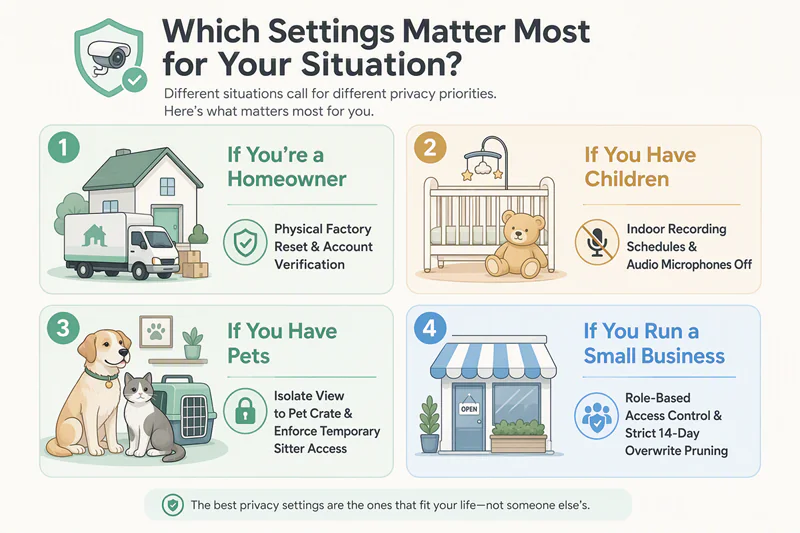
If You’re a Homeowner
For most homeowners, the highest priorities are surprisingly simple.
A front-door camera may need to watch the porch, steps, and approach path—but not treat every person walking down the sidewalk as an event that needs your attention.
Start by placing cameras where they can clearly see important entry points without unnecessarily recording neighboring property or public spaces. Then make sure the right people have secure access to your cameras and recordings.
You do not need to perfect every advanced setting before your system becomes useful.
A camera that consistently watches the right places at the right times will usually provide more value than one filled with features that are rarely used.
If You Have Children
Families often have different privacy priorities because cameras may be placed inside the home as well as outside.
Indoor cameras can provide reassurance, but they also record the spaces where everyday family life happens.
This is especially true for nursery cameras, video baby monitors, and cameras placed in shared family spaces.
Think carefully about when those cameras should be active, who can view recordings, whether audio should always be enabled, and whether notification previews or shared access reveal more information than necessary.
As your family’s routines change, revisit those decisions occasionally. A camera that made sense during one stage of life may deserve different settings later.
Privacy inside the home deserves the same thoughtful attention as security outside it.
If You Have Pets
Many people install an indoor camera simply to check on a pet while they are away.
In these situations, the goal is usually reassurance rather than constant observation.
A camera may only need to watch your pet’s usual area rather than the entire room. It may only need to record while the household is away instead of throughout the day. If someone is caring for your pet while you travel, temporary access to a single camera may be more appropriate than permanent access to your entire system.
Two-way audio can also be useful for some households, but remember that microphones may capture more of everyday home life than you intend.
A useful pet camera quietly supports your routine without watching more, recording more, or sharing more than necessary.
If You Run a Small Business
Small-business owners often have additional responsibilities because cameras protect both property and the people who work there.
Cameras should protect entrances, customer areas, cash-handling locations, or inventory—not monitor spaces where people reasonably expect privacy.
Clearly decide who should have access to live video and recordings, how long footage should be kept, and how recordings will be shared if an incident occurs.
Employees should understand where cameras are used and what their purpose is. Customer-facing cameras should be placed and used for a clear security purpose, not to collect more information than the situation requires.
A thoughtful camera system helps create a workplace that feels both secure and respectful.
The Best Settings Are the Ones You Understand
Every home and business is different.
Some people need cameras to watch a front door. Others want to check on children, monitor a pet, or protect a small business.
The details may change, but the five privacy boundaries remain remarkably consistent.
When your camera has a clear purpose, watches the right areas, follows predictable rules, limits access appropriately, and handles recordings responsibly, you have already made the decisions that matter most.
Everything else is refinement.
Thoughtful camera settings are rarely the most complicated ones.
They are the ones you understand well enough to trust every day.
Now that you have seen how these principles apply in different situations, the next step is bringing them together into a simple checklist you can use when setting up or reviewing any security camera.
The goal is not to remember every feature your camera offers.
It is to remember the questions that help you make thoughtful decisions.
Questions to Ask Yourself Before Saving Your Settings
By this point, you have seen how thoughtful privacy decisions begin with purpose, clear boundaries, and practical priorities.
Before you finish setting up your camera—or before you save changes to an existing system—it can be helpful to pause for one final review.
Rather than asking whether you have enabled every available feature, ask whether your camera still reflects the decisions you intended to make.
The questions below are not meant to create more work.
They are simply a quick way to confirm that your camera is doing its job without collecting, sharing, or recording more than necessary.
Does This Camera Have a Clear Job?
Think about why this camera exists.
Can you describe its purpose in one simple sentence?
Perhaps it watches your front door, checks on a nursery while a baby sleeps, monitors a pet while you’re away, or protects the entrance to your business.
If the camera’s purpose is clear, choosing the right settings becomes much easier.
Is It Watching Only What It Needs To?
Take another look at the camera’s view.
Does it mainly capture the area you intended to protect?
Or has the view gradually expanded to include neighboring property, shared spaces, or parts of your home that do not need to be recorded?
Small adjustments to placement often improve privacy more than changing software settings.
If placement cannot solve the problem completely, consider whether a privacy zone is needed for part of the remaining view.
Is It Paying Attention to What Matters?
Think about the alerts and motion events your camera creates.
Is it notifying you about the activity you genuinely care about—or is it reacting to passing cars, moving branches, sidewalk traffic, pets, or other background movement?
If the camera is noticing too much, review its activity zone, motion zone, or sensitivity settings. If it is missing important events, make small adjustments until its alerts become useful again.
The goal is not for your camera to react to everything it can see. The goal is for its attention to stay focused on what matters.
Do the Recording and Audio Rules Still Match Everyday Life?
Ask yourself when this camera actually needs to be active.
Also ask whether audio still serves a clear purpose in this space and whether people would reasonably expect conversations to be recorded.
Should it record only when nobody is home?
Only after business hours?
Only when motion occurs?
Family routines, work schedules, and daily habits change over time.
Your camera’s recording rules should occasionally change with them.
Does the Right Person Have the Right Access?
Think about everyone who can currently view live video, recordings, or camera settings.
Would you still choose those same permissions today?
If someone no longer needs access—or only needs temporary access—it may be time to review those permissions.
Thoughtful access is less about the number of people and more about making sure each person has access for a clear reason.
If Something Happened Today, Would I Be Comfortable With Where the Footage Goes?
Imagine your camera records an important event today.
Who would receive notifications?
Where would the recording be stored?
Could it appear on another device, be downloaded, or be shared with someone else?
Following that journey for a moment is often enough to reveal settings worth reviewing.
Do These Settings Still Fit My Life?
Your camera settings do not need to be perfect. They need to fit your real routine, your comfort level, and the people who share the space.
If you understand why the camera is placed where it is, what it notices, when it records or listens, who can access it, and where recordings may appear, you have already addressed the decisions that matter most.
As your household, business, routines, or relationships change, you can return to these same questions and adjust the settings with confidence.
You do not need to remember every recommendation in this guide every time you install a new camera.
Remember the questions instead.
They provide a practical way to review almost any security camera, regardless of the manufacturer or app you use.
The following checklist brings those questions together into one simple reference you can return to whenever you set up, review, or update a camera.
Final Privacy Review Checklist
You’ve now worked through the five privacy boundaries and seen how they apply to different homes, families, and businesses.
You do not need to remember every camera setting or every feature in your app.
Instead, use this checklist whenever you install a new camera, review an existing one, or make changes to your home or business.
A thoughtful camera setup is rarely about checking every box perfectly. It is about making intentional decisions that continue to fit your life.
Before You Save Your Camera Settings
□ Does this camera have a clear job?
Can you explain—in one simple sentence—why this camera exists?
Every setting becomes easier when the camera has a clear purpose.
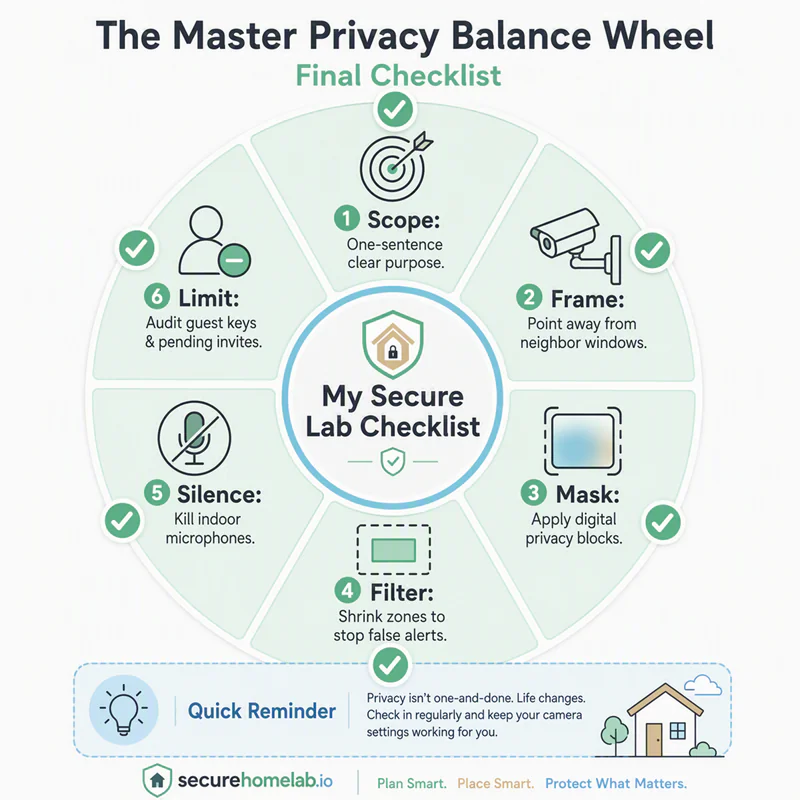
□ Is it watching only what it needs to?
Does the camera view focus on the area that actually needs protection?
If moving the camera would improve privacy, adjust its placement first. If needed, use a privacy zone to hide part of the remaining view.
□ Is it paying attention to what matters?
Are activity zones, motion zones, or motion sensitivity helping the camera notice meaningful events?
Or is it still reacting to passing traffic, moving branches, pets, or other everyday activity that does not need your attention?
□ Do the recording and audio rules still match everyday life?
Does this camera become active when it genuinely needs to?
Does audio still serve a clear purpose here?
Would people reasonably expect conversations to be recorded in this space?
□ Does each person have only the access they need?
Does everyone with access still have a legitimate reason for it?
Can each person view only the cameras they actually need?
If temporary access was shared, has it been removed?
□ If something happened today, would you be comfortable with where the recording goes?
Who would receive notifications?
Where would the recording be stored?
Could it appear on another device, be downloaded, or be shared with someone else?
Following that journey often reveals settings worth reviewing.
□ Do these settings still fit your life?
Homes change.
Families grow.
Businesses evolve.
Return to these questions whenever your routines, relationships, or responsibilities change.
You do not need to build a perfect setup.
You simply need one that continues to fit the people and places it protects.
Quick Reminder
You do not need to master every advanced feature before your camera can be used responsibly.
If you can confidently answer the questions above, you have already addressed the privacy decisions that make the biggest day-to-day difference.
Advanced features can wait until they solve a problem you actually have.
If you still have questions about specific camera settings or privacy situations, the answers below cover the topics readers ask most often.
Frequently Asked Questions
By this point, you’ve already worked through the five privacy boundaries, reviewed the settings that matter most for your situation, and completed the final privacy checklist.
The questions below address a few of the topics readers ask most often. Rather than introducing new rules, they reinforce the ideas you’ve already learned throughout this guide.
Should I move the camera or use a privacy zone?
Whenever possible, begin with placement.
Moving a camera so it naturally avoids a neighboring window, sidewalk, or other unnecessary area usually creates a clearer privacy boundary than relying on software alone.
If changing the camera’s position cannot completely solve the problem, a privacy zone can help hide part of the remaining view.
A good rule to remember is simple:
Adjust placement first. Use privacy zones second.
What is the difference between privacy zones and activity zones?
Privacy zones control visibility. They help block or mask parts of the camera’s view that do not need to be visible or recorded.
Activity zones control attention. They tell the camera where motion deserves alerts, events, or motion-triggered recording.
In simple terms:
- Privacy zones: “Do not show this area.”
- Activity zones: “Do not notify me about movement outside this area.”
If an area should not be captured at all, improve placement or use a privacy zone. If it can remain visible but does not deserve alerts, use an activity zone.
Is continuous recording better than motion-triggered recording?
Neither option is automatically better.
Continuous recording can provide a fuller timeline before and after an event.
Motion-triggered recording can reduce storage use and capture fewer unnecessary clips.
The right choice depends on the camera’s job, its location, your available storage, and your comfort level.
Rather than asking which recording mode is “best,” ask:
Which approach best supports this camera’s purpose?
Should indoor cameras stay on all the time?
Not necessarily.
Many people prefer different recording rules for indoor cameras than for cameras watching entrances, driveways, or other outdoor areas.
Schedules, privacy modes, physical shutters, or similar features can help an indoor camera step back when continuous monitoring is unnecessary.
The goal is not to record as much as possible.
It is to choose rules that fit your home, your routine, and the people who share the space.
Is cloud storage less private than local storage?
Neither storage method is automatically more private.
Local storage gives you direct control over where recordings are kept.
Cloud storage may provide off-site backup, remote access, and protection if a camera or local recorder is stolen.
Each approach creates different responsibilities.
The important question is not simply where recordings are stored, but who can access them and how they are protected.
Can shared users download, delete, or share clips?
It depends on the camera system and the permission level you assign.
Some shared users may only be able to view live video. Others may be able to watch recordings, download clips, delete footage, share videos, change settings, or invite additional users.
Before sharing access, check what that person will actually be able to do—not just which cameras they can view. Whenever possible, give each person the smallest level of access that meets their needs.
Does deleting a clip remove it everywhere?
Not always.
Deleting a recording from your camera account may remove the original copy from that account or its connected storage, depending on your system.
It may not remove copies that were already downloaded, forwarded, saved to another device, or shared through another service.
A shared link may expire or be revoked, but a file someone has already downloaded may be outside your control.
Before sharing footage, assume that a downloaded copy may continue to exist even if you later delete the original.
Can cameras appear on smart displays or other connected devices?
Yes, depending on your camera and smart-home setup.
A camera feed may also appear on a smart display, television, tablet, home hub, voice assistant, or lock-screen notification preview. Some systems can automatically display a live feed when motion is detected or when someone asks a voice assistant to open the camera.
Review which connected devices can access your cameras, who can use those devices, and where those screens are located.
Camera privacy includes the places footage appears—not only where it is stored.
Can I trust geofencing to turn indoor cameras on and off?
Geofencing can be convenient, but it should not be treated as a perfect guarantee.
It relies on phone location, app permissions, battery settings, network connections, and the routines of everyone in the household. It may not behave exactly as expected if someone leaves a phone behind, arrives without one, or if the app loses location access.
Use geofencing when it makes your routine more convenient, but test it first and understand what happens if it does not trigger correctly.
Predictable behavior is more important than complicated automation.
Should I enable facial recognition?
Only if it solves a problem you actually have.
Facial recognition goes beyond detecting that someone is present. It attempts to identify who that person is.
Before enabling it, ask yourself:
Would knowing this person’s identity actually change what I do?
If the answer is no, you may not need the feature.
How often should I review my camera settings?
There is no fixed schedule.
Instead, review your settings whenever something meaningful changes.
For example:
- after moving to a new home,
- after changing household routines,
- after sharing or removing access,
- after adding new cameras,
- after changing how the space is used.
Returning to the final checklist from time to time is usually more valuable than constantly adjusting individual settings.
Which privacy setting makes the biggest difference?
There usually isn’t one.
The biggest improvements come from making several thoughtful decisions that work together.
A camera with a clear job…
watching only what it needs to…
paying attention to meaningful events…
recording at appropriate times…
shared responsibly…
and managed thoughtfully after recording…
will usually provide better privacy than one relying on a single “perfect” setting.
Privacy is rarely created by one feature.
It is created by clear boundaries working together.
With those questions answered, we can return to the simple idea behind this entire guide.
You Do Not Need Perfect Privacy Settings
When many people first open the settings for a security camera, they are greeted by dozens of options, unfamiliar terms, and more choices than they expected.
It is easy to assume that creating a private, secure camera system means understanding every feature before making a single decision.
Fortunately, that is rarely true.
You simply need to make a few thoughtful decisions.
Give each camera a clear job.
Let it watch the areas that actually need protection.
Help it pay attention to meaningful activity.
Decide when it should be active.
Share access carefully.
And understand where recordings may go after they are captured.
Those decisions create the boundaries that matter most.
Once those boundaries are clear, individual settings become easier to understand because they support a purpose instead of becoming goals themselves.
You do not need to create a perfect camera setup. You do not need to enable every advanced feature. And you do not need to optimize every option simply because your camera offers it.
Instead, aim for something more valuable: a camera with a clear purpose, appropriate limits, thoughtful access, predictable behavior, and settings you understand well enough to adjust with confidence.
Your settings may change over time. A camera that makes sense during one season of life may need different boundaries later. A pet camera may become a nursery camera. A temporary shared user may no longer need access. A new routine may change when an indoor camera should be active.
That does not mean you set things up incorrectly the first time.
It simply means privacy is not a one-time switch. It is an ongoing way of making sure your technology still fits your life.
The important thing is that you now know what to ask.
When a new setting appears, you do not have to wonder whether you are supposed to enable it. Start with a simpler question:
Does this help the camera do its job while respecting the people and places around it?
If the answer is yes, it may be worth exploring. If the answer is unclear, you can leave it alone for now.
Technology works best when it supports the life happening around it — not when life begins revolving around the technology.
A thoughtful camera system is not the one with the most features enabled. It is the one whose purpose, boundaries, and behavior make sense to the people who live with it.
The best security systems do more than protect property.
They respect the people they are there to protect.