
Choosing a security camera system for a small business can feel overwhelming — especially when many options require ongoing monthly fees.
The good news is that you don’t need a subscription to build a reliable, professional setup. In this guide, we’ll break down the best security cameras for small businesses that offer local storage, strong performance, and no required monthly fees, along with practical advice to help you choose the right system for your space.
The best security cameras for small businesses without subscription are reliable systems with local storage and optional 24/7 recording.
Quick Answer: Best Security Cameras for Small Business
The best security camera system for small businesses without a subscription is a REOLINK 4K PoE security system, because it provides reliable wired performance, centralized video storage, and the ability to monitor multiple cameras from one place.
Other strong options include the Reolink CX410 PoE for retail environments, the TP-Link Tapo C120 for simple indoor setups, and the Reolink Duo 3 PoE for large or open spaces.
The right choice depends on your business type, layout, and whether you prefer a fully wired system or a more flexible wireless setup.
Disclosure: This article may contain affiliate links. If you purchase through these links, I may earn a small commission at no additional cost to you.
Compare the Best Security Cameras for Small Business
| Camera / System | Best For | Type | Recording | Storage | Key Strength | Limitation |
| REOLINK 4K PoE security system | Full business setup | Wired (PoE) | 24/7 | Local (NVR) | Most reliable, scalable | Installation required |
| REOLINK CX410 PoE | Retail / transactions | Wired (PoE) | 24/7 | Local (NVR/SD) | Color night vision, continuous recording | Fixed viewing angle |
| REOLINK Duo 3 PoE | Warehouses / large spaces | Wired (PoE) | 24/7 | Local (NVR/SD) | Ultra-wide coverage | Less detail at distance |
| TP-Link Tapo C120 | Offices / indoor | Wi-Fi | Motion | Local (SD) | Affordable, easy setup | Limited coverage |
| TP-Link Tapo (2–4 camera setup) | Budget setups | Wi-Fi | Motion | Local (SD) | Lowest cost to start | No central system |
| EufyCam 3 (S330) | Wireless alternative | Wireless | Motion | Local (HomeBase) | Easy install, no wiring | No true 24/7 recording |
👉 Tip: If you want the most reliable setup with room to grow, a wired PoE system is usually the best long-term choice for small businesses.
👉 Tip: If your business handles customers, payments, or inventory, a wired system with 24/7 recording is usually the safest long-term choice.
How We Chose These Cameras
- No required subscription
- Reliable local storage
- Suitable for real business use (not just home use)
- Strong video quality for identification
- Practical installation for small businesses
Which Security Camera Setup Should You Choose?
If you’re not sure which option is right for your business, here’s a simple way to decide:
- Choose REOLINK 4K PoE security system
if you want the most reliable, long-term solution with multiple cameras and centralized storage. - Choose REOLINK CX410 PoE
if you run a retail shop and want wide coverage and good indoors setup with strong smart features. - Choose TP-Link Tapo C120
if you need a simple and discreet indoor camera for an office or small workspace. - Choose REOLINK Duo 3 PoE
if you need to cover a large open space like a warehouse or parking area. - Choose TP-Link Tapo (multi-camera setup)
if you’re starting small and want the lowest upfront cost. - Choose EufyCam 3 (S330)
if you want wireless alternative where running cables isn’t practical.
👉 Most small businesses end up choosing either a PoE system (for reliability) or a simple multi-camera setup (for budget and flexibility).
👉 If you want more options, see our guide to security cameras without monthly fees.
Is a No-Subscription Security Camera Worth It for a Small Business?
For most small businesses, the answer is yes — and often by a wide margin.
Here’s why.
💰 Monthly Subscription Costs Add Up Quickly
Many cloud-based systems charge:
- $5–$15 per camera per month
For a small business with 4 cameras:
- $20–$60 per month
- $240–$720 per year
- $1,200–$3,600 over 5 years
👉 That’s often more than the cost of the cameras themselves.
📉 One-Time Cost vs Long-Term Savings
A no-subscription setup typically involves:
- Higher upfront cost
- No ongoing fees
Example:
- Reolink PoE system: ~$400–$800 upfront
- Monthly fees: $0
👉 Break-even often happens within 6–12 months compared to subscription systems.
Risk Reduction (The Real ROI)
The biggest return isn’t just saving on fees—it’s reducing costly problems:
- Theft or shoplifting
- Internal loss (employee theft)
- False claims or disputes
- Property damage
Even preventing one incident can cover the entire cost of your system.
⏱️ Operational Benefits
Security cameras also help with:
- Monitoring daily operations
- Reviewing incidents quickly
- Improving staff accountability
👉 These indirect benefits often matter more than the hardware itself.
Simple ROI Example
- System cost: $600
- Monthly subscription avoided: $40
- Annual savings: $480
👉 System pays for itself in ~15 months, then continues saving money.
Bottom Line
A no-subscription system is usually the better choice if you:
- Want predictable costs
- Plan to use the system long-term
- Prefer owning your footage
👉 For most small businesses, it’s not just a cost — it’s a smart investment in security and control.
Recommended Setup (Simple & Reliable)
If you want a straightforward, reliable setup without overthinking it, this is what most small businesses should start with:
✅ Recommended Small Business Camera Setup
- System: REOLINK 4K PoE NVR kit
- Cameras: 4–6 wired cameras (expandable later)
Storage: Local NVR (no subscription required)
📍 Suggested Camera Placement
- 1 × Front entrance
- 1 × Register / front desk
- 1–2 × Main business area
- 1 × Back entrance or storage room
- Optional: 1 × Outdoor / parking area
👍 Why This Setup Works
- Reliable wired connection (no Wi-Fi dropouts)
- Centralized recording for all cameras
- Scales easily as your business grows
- No monthly fees
👉 This setup works well for retail stores, offices, cafés, and most small businesses.
💡 Quick Tip
If running cables isn’t practical, a wireless option like EufyCam 3 can be a good alternative — but for long-term reliability, wired systems are usually the better choice.
👉 Start Here
If you’re unsure where to begin, start with a 4-camera system, Reolink 4K PoE NVR Kit, and expand as needed. Most businesses find this covers their key areas effectively.
Mistake-Proof Checklist Before You Buy
Before choosing a security camera system for your business, take a minute to run through this quick checklist:
✅ Coverage & Placement
- Have you identified your main entry points (front door, back door, side access)?
- Are you covering high-risk areas like registers, storage rooms, or inventory?
- Will your cameras capture faces clearly, not just general movement?
✅ Camera Type & Setup
- Do you want a wired system (more reliable) or wireless (easier to install)?
- If choosing wireless, is your Wi-Fi signal strong enough in all areas?
- Would a centralized system like a Reolink PoE setup make management easier?
✅ Storage & Subscription
- Does the system offer local storage (SD card, NVR, or base station)?
- Are all key features usable without a monthly subscription?
- Do you have enough storage for several days of footage?
✅ Video Quality & Night Performance
- Is the resolution high enough to identify people clearly?
- Does the camera perform well in low light or nighttime conditions?
- Are cameras positioned to avoid glare, shadows, or backlighting?
✅ Installation & Practical Considerations
- Do you have a plan for mounting height and angle?
- Can you test camera views before installing permanently?
- If using wired cameras, are you comfortable running cables or hiring help?
✅ Privacy & Legal Awareness
- Are you avoiding areas where people expect privacy (restrooms, private rooms)?
- Are you aware of local laws regarding audio recording?
- Are cameras positioned to avoid recording neighboring properties unnecessarily?
✅ Future Growth
- Can your system expand with additional cameras later?
- Will it still meet your needs if your business grows or layout changes?
Quick Reality Check
If you can confidently answer “yes” to most of the questions above, you’re likely choosing a system that will work well long-term.
If not, it’s worth revisiting your setup — because fixing gaps later is often harder than getting it right the first time.
Why Small Businesses Avoid Subscription Cameras
Many business owners prefer cameras without subscriptions for a few key reasons:
- No recurring monthly fees
Helps keep operating costs predictable - Full ownership of footage
Video is stored locally, not controlled by a third-party service - No feature lock behind paywalls
Motion alerts, recordings, and playback work without extra fees - Better long-term value
Higher upfront cost, but lower total cost over time
👉 For most small businesses, avoiding subscriptions is both a financial and practical decision.
What “No Subscription” Means for Business Use
Not all “no subscription” cameras work the same way.
True No Subscription
- Local storage (SD card, NVR, or base station)
- Full functionality without paying monthly
Optional Subscription
- Core features work without a plan
- Cloud storage or advanced features may cost extra
For many businesses, the storage decision is just as important as the camera choice. Our guide to local storage vs cloud storage for security cameras explains the tradeoffs between ownership, backup, remote access, and long-term costs.
Wired vs Wireless Security Cameras for Small Business
Wired (PoE):
- More reliable
- Supports 24/7 recording
- Best for permanent setups
Wireless:
- Easier to install
- Flexible placement
- Better for small or temporary setups
👉 For most businesses, wired systems are the better long-term choice.
24/7 Recording vs Motion Recording: What’s Better for Business?
24/7 Recording:
- Captures everything
- Better for disputes and liability
- Uses more storage
Motion Recording:
- Saves storage
- Easier to review
- May miss important moments
👉 For most businesses, especially those handling customers or transactions, continuous recording is the safer choice.
How Much Storage Does a Small Business Need?
- 4 cameras (1080p–4K): ~1–3TB for 1–2 weeks
- Motion-only setups use less storage
- NVR systems make storage easier to manage
👉 Most small businesses aim to keep at least 7–14 days of footage.
Best Security Cameras for Small Business
Best Overall: REOLINK 4K PoE NVR System
A PoE (Power over Ethernet) system is one of the most reliable options for small businesses.
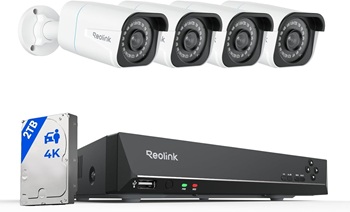
Why it stands out:
- Wired connection = stable and consistent
- Central NVR for recording all cameras
- No subscription required
- Scales easily as your business grows
Best for:
- Retail stores
- Offices
- Restaurants
- Multi-camera setups
Pros:
- Highly reliable
- Clear 4K footage
- One system manages everything
Cons:
- Require installation (running cables)
- Higher upfront cost
👉 This is the closest thing to a professional-grade system without monthly fees.
Best for Retail Stores (Continuous Recording): REOLINK CX410 PoE
A reliable wired camera designed for businesses that need clear, continuous video — especially in customer-facing areas.
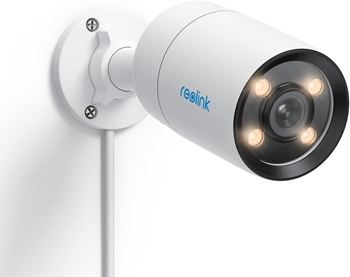
Why it stands out:
- Supports 24/7 continuous recording (ideal for transactions and disputes)
- Color night vision helps capture more usable detail in low light
- Stable PoE connection avoids Wi-Fi dropouts
Best for:
- Retail stores
- Convenience shops
- Cafés and small restaurants
- Any business with a register or customer interaction
Pros:
- Continuous recording for full coverage
- Clear image quality, even at night
- Reliable wired performance
- No subscription required
Cons:
- Requires running Ethernet cables
- Fixed field of view (may need multiple cameras for full coverage)
👉 For retail environments where every moment matters, a wired camera like this is a more dependable choice than motion-only systems.
Best for Office: TP-Link Tapo C120
A simple and affordable indoor camera for office environments.
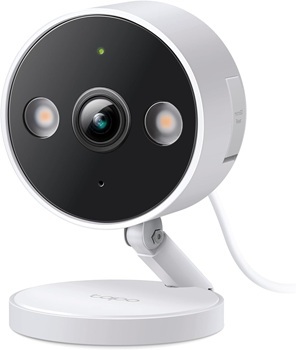
Why it works well:
- Easy setup
- Compact and discreet
- Good for monitoring entrances and hallways
Best for:
- Offices
- Studios
- Small workspaces
Pros:
- Budget-friendly
- Simple app control
- Solid indoor performance
Cons:
- Not ideal for large areas
- Limited range compared to systems
If your business requires multiple cameras or centralized storage, consider pairing this with a full REOLINK PoE security system.
Best for Warehouses / Large Spaces (Wide + 24/7 Coverage): REOLINK Duo 3 PoE
A wide-angle PoE camera built to cover large areas with fewer cameras, while still providing continuous recording.
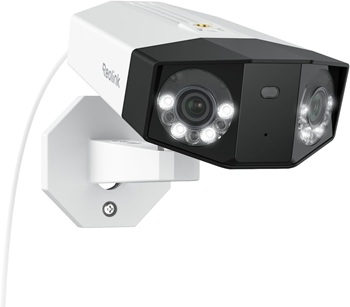
Why it stands out:
- Dual-lens design creates an ultra-wide panoramic view
- Continuous 24/7 recording for full visibility
- PoE connection ensures stable, low-maintenance operation
Best for:
- Warehouses
- Large storage areas
- Parking lots
- Open commercial spaces
Pros:
- Covers more area with fewer cameras
- Reliable wired connection
- Reduces blind spots in large spaces
- No subscription required
Cons:
- Requires wired installation
- Wide view may reduce detail at longer distances
- Higher upfront cost than basic cameras
👉 For large spaces, using fewer wide-angle PoE cameras can simplify your setup while still maintaining strong coverage.
Best Budget Setup: TP-Link Tapo (multi-camera setup)
For small businesses on a tighter budget, using multiple TP-Link Tapo cameras can provide solid coverage without the cost of a full system.
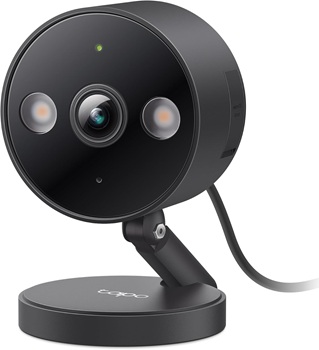
Why it works:
- Low upfront cost
- Easy to scale by adding more cameras
- Good for basic monitoring needs
Best for:
- Startups
- Small offices
- Low-risk environments
Best Wireless Alternative: EufyCam 3 (S330)
The EufyCam 3 is a strong option for customer-facing environments.
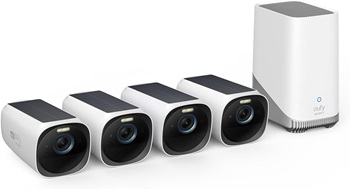
Why it works well:
- Clean design for visible areas
- Good motion detection and alerts
- Local storage with HomeBase
Best for:
- Small shops
- Boutiques
- Cafés
Pros:
- Easy to install
- No required subscription
- Smart detection features
Cons:
- Not as scalable as a full system
- Requires base station
Which Camera Setup Fits Your Business?
Retail Store or Small Shop
Focus on:
- Entrance
- Cash register
- Sales floor
Best fit:
Office or Professional Space
Focus on:
- Entry points
- Hallways
- Shared work areas
Best fit:
Warehouse or Large Space
Focus on:
- Wide coverage
- Fewer blind spots
Best fit:
Restaurant or Café
Focus on:
- Entrance
- Register
- Dining area
Best fit:
- Mix of indoor + wide-angle cameras
👉 If you’re unsure where to place cameras, see our guide on where to place security cameras.
👉 If you’re comparing options, see our guide to security cameras without monthly fees…
Example Small Business Camera Setup
A basic setup for a small retail shop or office might look like:
- 1 camera at the main entrance
- 1 camera focused on the register or front desk
- 1–2 cameras covering the main floor or workspace
- 1 camera in the storage or back room
- 1 outdoor camera for the parking lot or rear entrance
👉 This setup provides strong coverage without overcomplicate.
👉 Start small, then expand as needed.
Installation Tips for Business Environments
- Prioritize entrances and transaction areas
- Ensure good lighting for clear footage
- Avoid blind spots in key areas
- Test camera angles before mounting
👉 Proper placement matters as much as the camera itself.
👉 A business camera system needs more than good coverage and reliable storage. Before going live, decide who can view live feeds and recordings, when cameras should be active, how long footage should be kept, and how clips will be shared after an incident. Our guide to security camera privacy settings provides a practical framework for making those decisions.
Common Mistakes Business Owners Make
- Only covering entrances
- Ignoring internal theft risks
- Choosing the cheapest option without considering storage
- Overlooking camera placement
Small Business Camera Privacy and Legal Tips
When installing cameras in a business, be mindful of privacy laws and expectations:
- Avoid private areas (restrooms, changing rooms)
- Post signage if required in your area
- Be cautious with audio recording laws
👉 Transparency helps build trust and avoids legal issues.
Final Recommendation
For most small businesses, the best approach is to start with a reliable, no-subscription system that fits your space and budget.
A PoE system offers the most reliability, while simpler wireless cameras can work well for smaller setups.
👉 If you’re new to security systems, reviewing home security system basics can help you make a more informed decision.